
Table of Contents
- Introduction: Why Agentic Assistants Now Matter
- Foundations: How Agentic Assistants Actually Work
- Agentic Prompting: Shaping Behaviour, Not Just Outputs
- Agentic Workflows: From Single Tasks to End-to-End Processes
- Comparison: Agentic Assistants, Standard Assistants, and Rule-Based Automation
- Strategic Value: Productivity, Performance, and Competitive Advantage
- Prompt Styles: Simple vs Agentic and When to Use Each
- Practical Tips: Getting Ready for Agentic Assistants in Your Workplace
- Conclusion: Set the Direction Before You Scale the Tech
Introduction: Why Agentic Assistants Now Matter

Many Australian teams have tried generative AI in the workplace, usually as a chatbot for drafting emails or summarising documents. Useful, yes. Transformational, not yet. Part 1 of our series, “Agentic Prompting Assistants in the Workplace: From Concept to Compliance,” looks at the next step: systems that do not just answer; they act.
These systems, often called agentic prompting assistants, can pursue goals across multiple steps, coordinate tools, and improve their own performance. Instead of typing a prompt, getting a single reply, and doing the rest yourself, you give a clear outcome—“prepare, run, and recap our monthly customer success review”—and the assistant plans and executes most of the work.
For executives, this raises questions. When should you let software take initiative? How does this differ from traditional automation or the chatbots already in your organisation? And where is the real productivity and strategic upside versus the hype? In this article, LYFE AI outlines how these assistants work, how agentic prompting shapes their behaviour, and when they are the right tool for the job.
Foundations: How Agentic Assistants Actually Work
“Agentic” AI refers to a system that can understand a goal, decide how to reach it, and then take actions through tools and apps. Instead of reacting to each single question, it behaves more like a junior colleague with a to‑do list: interpreting objectives, planning steps, choosing tools (email, CRM, calendar, APIs), adapting if things change, and using memory to improve next time.
Technically, these assistants are intelligent agents combining a language model with planning logic, access to external systems, and working memory. Planning breaks a goal into sub‑tasks and orders them. Tool access lets them send emails, query databases, update CRM records, or draft documents. Memory tracks what has been done and what is pending across a workflow.
This differs from the basic “ask and answer” pattern most teams know. A standard assistant waits for you to specify each step: “Draft the email.” “Now create the agenda.” “Now log these notes.” An agentic assistant is designed to own the sequence. You might say, “Coordinate our next three customer check‑ins for Tier A accounts this month,” and it can look up accounts, propose times, draft outreach, and prepare a summary pack.
Because it can adapt to conditions—such as a client not responding or a date conflict—it behaves less like a static tool and more like an autonomous process manager. That autonomy is where much of the value lies and where governance and guardrails become crucial. The “agentic” label is tied to goal‑driven behaviour, not just a smarter chatbot shell, a view that aligns with emerging definitions of agentic AI from cloud and infrastructure providers.
Agentic Prompting: Shaping Behaviour, Not Just Outputs
If agentic assistants are the “body” of this capability, agentic prompting is the “nervous system.” It is the practice of writing instructions so the system pursues an outcome through planning, tool use, memory, and self‑correction, rather than generating a one‑off answer.
Instead of “Summarise this email,” you might say, “Manage my weekly marketing cycle: research current social trends for Australian SaaS, propose a content calendar, draft the posts, schedule them via the social API, and flag any brand‑risk issues you see.” That single prompt invites the assistant to break down the work, choose a sequence, call tools at each stage, and check its own output before returning it.
Effective agentic prompting usually includes four elements: clear goals and success criteria; permission to decompose tasks and decide the order; explicit access to tools and data sources with rules about when to use them; and instructions to maintain working memory across the task and self‑review its work.
In practice, the prompt reads like a mini playbook: objective, constraints, steps, checks. Once you see an assistant plan its own approach, call the right tools at the right moment, and fix early mistakes without prompting, the difference in output quality becomes obvious. This is where agentic prompting shifts how work gets done, echoing patterns in guides to reliable agentic workflows.
Agentic Workflows: From Single Tasks to End-to-End Processes
An agentic workflow is one where an AI agent owns an entire process, not just one isolated step. It can move across systems, coordinate actions, and keep track of progress from start to finish.
Think about a typical sales operations process in an Australian B2B company. Today, a sales rep logs lead notes, a coordinator creates an opportunity in the CRM, marketing sends nurture emails, and a manager reviews pipeline. In an agentic workflow, an assistant can read inbound queries, check qualification criteria, create or update records, draft responses, and prepare a manager summary—without a human needing to manually kick off each step.
These workflows rely on the assistant’s ability to call APIs and tools as needed. It might integrate with email, calendars, CRMs, project management platforms, and data warehouses. It decides locally what to do based on the latest information—rescheduling a meeting automatically when an attendee cancels, or shifting a task when a dependency slips. With logging and evaluation, the workflow can be tuned to be faster and more reliable, similar to agentic workflow frameworks now appearing in productivity tools.
Agentic workflows are particularly powerful for processes that cross multiple systems, change in real time, or require judgement about priorities. Customer support triage, risk monitoring, content production, and internal IT service desks are all strong candidates. The assistant is no longer just “in the loop”; it is coordinating the loop, with humans intervening at key decision points or edge cases, which aligns with how no‑code agentic workflow platforms position human‑in‑the‑loop oversight.
Comparison: Agentic Assistants, Standard Assistants, and Rule-Based Automation
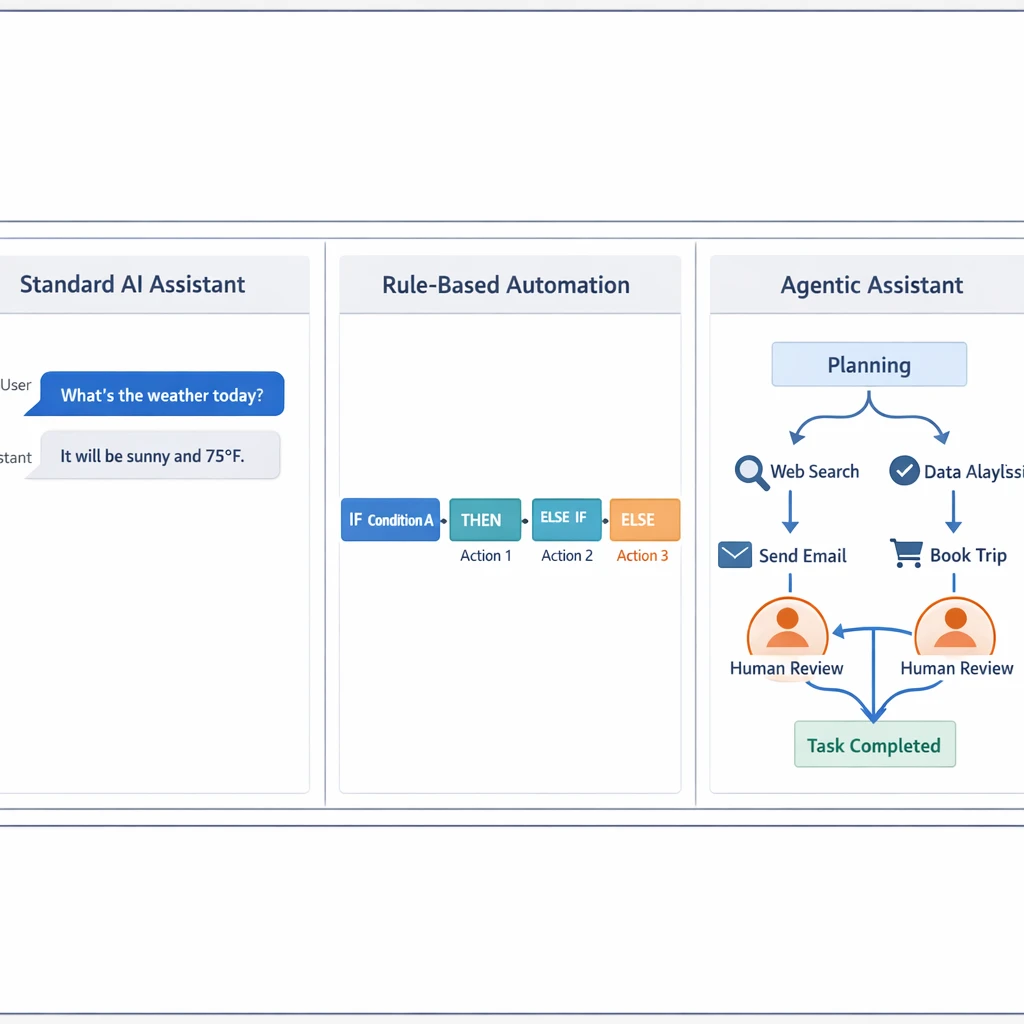
To see where agentic assistants fit, compare them with tools many organisations already use: standard AI assistants and rule‑based automation. All three aim to boost efficiency, but in different ways.
Standard assistants, like most chatbots and writing aids, are reactive. They respond one turn at a time. They do not plan across multiple steps, maintain long‑lived workflow memory, or routinely decide when to call a tool unless you explicitly tell them. They are useful for quick, easily checked tasks—drafting emails, rewriting paragraphs, summarising documents.
Rule‑based automation is deterministic. It relies on predefined if‑then logic: “if invoice status is overdue and amount > $5,000, then send reminder template B.” It handles repetitive, structured processes reliably and has been a mainstay in enterprise systems and robotic process automation, but it struggles with unstructured data, ambiguous cases, or situations where you cannot easily list every rule in advance.
Agentic assistants sit between these worlds. This lets them handle complex, multi-step, and ambiguous workflows—fraud detection that draws on multiple data sources or personalised customer journeys that change in real time. Early case studies and vendor reports suggest these systems can significantly reduce time spent on repetitive tasks in certain roles by coordinating work across tools, though the impact varies widely by workflow and implementation. At the same time, security researchers such as HUMAN Security caution that this kind of autonomy also introduces novel risks, from new attack surfaces to more scalable abuse patterns, which teams need to factor into their design and deployment decisions..
That extra capability comes with trade‑offs. Because agentic systems take actions, not just generate text, there is more risk of hallucinated decisions, misuse of tools, or “goal drift,” where the system chases an interpretation of the objective you did not intend. They can also be more complex and costly to operate. Standard assistants are simpler and lower risk, while rule‑based systems are predictable within a narrow domain but brittle when conditions change. The choice is not which is “best” overall, but which fits each specific job.
Strategic Value: Productivity, Performance, and Competitive Advantage
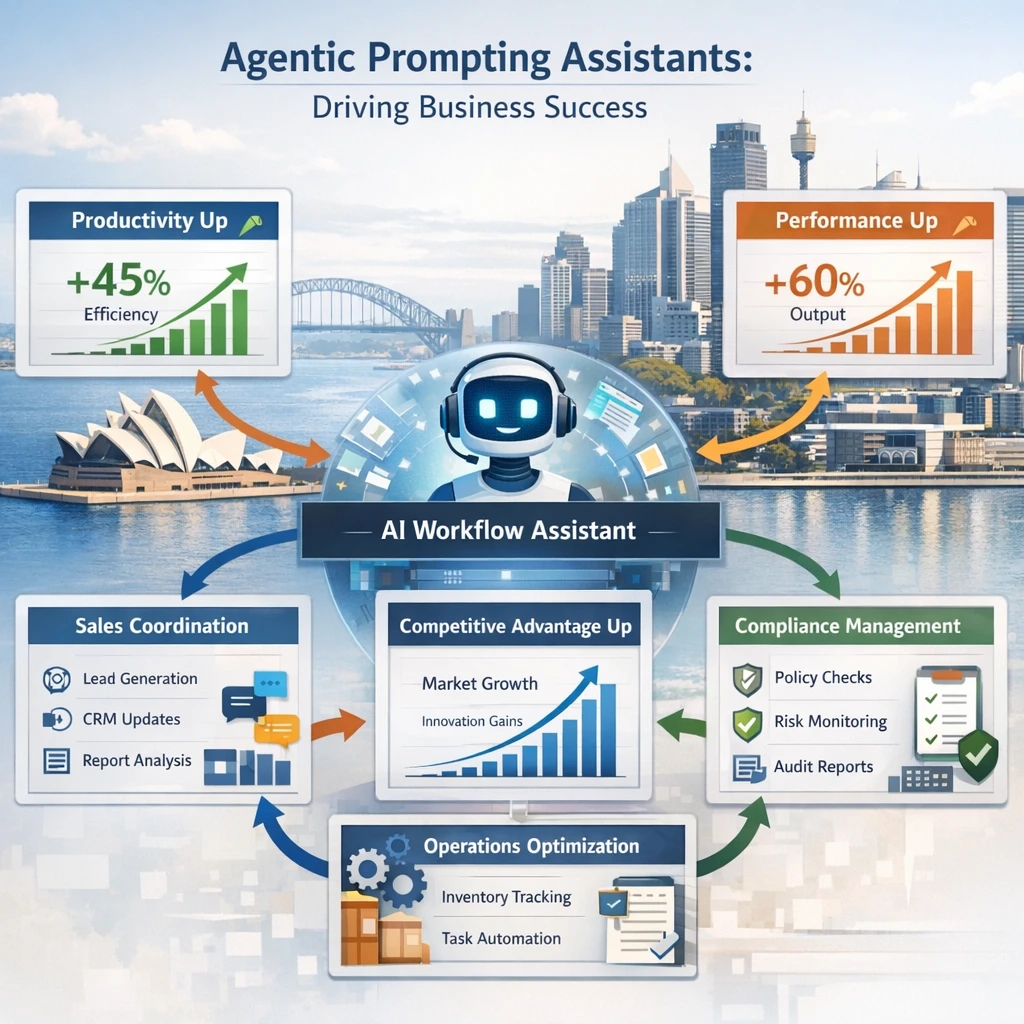
The attraction of agentic prompting in the workplace is leverage. When a system can plan, act, and self‑correct across a workflow, it can change the shape of a role, not just speed up one part of it, with implications for productivity, quality, and competitiveness for businesses in Australia.
On the productivity side, agentic systems can shorten end‑to‑end cycle times. A sales team might move from manual weekly reporting to near‑real‑time pipeline views curated by an assistant that pulls data, cleans it, and highlights risks. Operations teams can handle higher volumes of routine cases—such as standard service requests—without linearly increasing headcount, because the assistant handles the coordination work that used to fall between people and systems. Choosing the right underlying models, for example comparing GPT‑5.2 and Gemini 3 Pro for price–performance trade‑offs, becomes a practical lever in achieving these gains.
Performance can improve as well. Because these assistants can synthesise information from many sources and iterate on their own work, they can support better decisions. A risk monitoring agent, for instance, can scan multiple data streams, flag emerging issues, and cross‑check with previous incidents before recommending escalation. Self‑correction routines, where the agent checks its output against clear criteria, reduce basic errors that often slip into manual processes.
More autonomy, however, means more behavioural risk and higher compute and operational costs. There is a real chance of unintended actions or slow, inefficient plans if prompts and guardrails are poorly designed. Many organisations adopt a hybrid approach: use agentic prompting where work is multi‑step, ambiguous, or research‑heavy, and keep simple, reactive prompts for tasks where a quick, verifiable answer is enough. As teams learn and confidence grows, they can push more responsibility to the agents—but deliberately, not all at once.
Prompt Styles: Simple vs Agentic and When to Use Each
One way to think about this is to contrast two prompt styles aimed at the same objective. Imagine you want help with a monthly marketing newsletter. A simple, reactive prompt might be: “Draft a 600‑word newsletter for our existing customers summarising this month’s product updates.” You get one output, you review it, and then you do the rest—segmenting audiences, scheduling the send, tracking performance.
An agentic prompt for the same goal looks very different: “You are my lifecycle marketing assistant. For this month’s customer newsletter, (1) review our product update notes and customer FAQs, (2) propose a newsletter outline tied to three key benefits for Australian SMEs, (3) draft the copy, (4) segment our audience based on last‑login date and plan tier via the CRM API, (5) schedule sends to match local time zones, and (6) after sending, compile a performance summary with open and click‑through rates and propose A/B tests for next month. Ask for confirmation before any live send.” Here, the agent manages a mini‑campaign, not just the writing.
Simple prompts are best when the task is short, the result is easy to judge, and the cost of redoing the work is low. Drafting emails, brainstorming ideas, and rewriting copy into a different tone are natural fits and work well when you want tight human control.
Agentic prompting comes into its own when the work involves multiple steps, touches several tools, or depends on context that changes over time. Research and synthesis tasks, coordination of meetings and follow‑ups, ongoing monitoring of dashboards, and multi‑channel communication flows are all candidates. A sensible pattern is to start with simple prompts, then progressively “upgrade” them into agentic versions as you identify workflows that are repetitive, complex, and bottlenecked by manual coordination, following patterns in recent agentic workflow case studies.
Practical Tips: Getting Ready for Agentic Assistants in Your Workplace
Moving toward agentic prompting does not mean overhauling your entire tech stack. It starts with habits that align people, processes, and prompts around goals rather than isolated tasks.
First, map a few candidate workflows where coordination is painful today. Look for processes that span multiple systems, involve many hand‑offs, or suffer from delays because people are copying data between tools. In an Australian context, that could be onboarding new clients, managing grant applications, or handling internal IT access requests. These are fertile ground for agentic experimentation, and working with a partner that offers specialised AI services can accelerate this discovery phase.
Second, start rewriting instructions in more agentic terms, even when you are still using a standard assistant. Include the objective, constraints, steps you expect, and basic success criteria. You will quickly see where prompts are unclear or where you depend on tacit knowledge that only lives in someone’s head. Cleaning that up is valuable long before an agent touches it and lays the groundwork for custom AI models and automation that mirror how your organisation actually works.
Third, plan for oversight. Even in early pilots, decide what the agent is allowed to do automatically and what requires sign‑off. You might let it draft and queue emails but require human approval before anything sends, or allow it to create CRM tasks but not close deals. This creates a safe sandbox where your team can get comfortable with the behaviour of agentic systems, ideally supported by professional implementation and governance services.
Finally, treat this as capability building, not a one‑off project. Train staff to think in terms of outcomes and workflows. Encourage teams to share high‑performing prompts and patterns. As agentic assistants spread, this “prompt literacy” becomes a competitive asset—much as spreadsheet literacy did when analytics first moved onto everyone’s desktop. Understanding underlying assistant behaviour, including differences between fast “instant” and slower “thinking” model modes, helps teams make better trade‑offs between speed, cost, and reliability.

Conclusion: Set the Direction Before You Scale the Tech
Agentic prompting assistants mark a shift from AI as a helpful “answer engine” to AI as an active participant in work. They understand goals, plan, use tools, adapt, and learn, creating opportunities to redesign workflows, not just add a faster drafting tool.
In this first part of our series, we have focused on foundational ideas: what these assistants do, how agentic prompting shapes their behaviour, how they compare with existing automation tools, and when they are most valuable. The next steps—design patterns, deployment, and governance—will decide whether this capability becomes a strategic advantage or an expensive experiment.
If you want to explore where agentic assistants could move the needle in your organisation, now is the time to start mapping workflows and reframing work as goals, not just tasks. In Part 2, LYFE AI will delve into how to design and deploy these agentic patterns in everyday workflows, and in Part 3 we will tackle the compliance and governance questions that keep leaders up at night. For now, the opportunity is clear: set your direction, and then let the technology help you walk the path faster, ideally with a secure, Australian‑based AI partner that is transparent about terms and conditions and continuously improves its solutions through insights captured in resources like its AI knowledge hub and model comparison guides for OpenAI O‑series assistants.
Frequently Asked Questions
What is an agentic AI assistant and how is it different from a normal AI chatbot?
An agentic AI assistant doesn’t just answer prompts; it can plan and execute multi‑step tasks across tools to achieve a goal. Unlike a standard chatbot that responds turn‑by‑turn, an agentic assistant can break a goal into steps, call APIs or business systems, and adapt its actions based on feedback. This makes it better suited for complex, ongoing workflows rather than one‑off questions.
How can agentic prompting assistants be used in the workplace?
In the workplace, agentic assistants can coordinate routine, well‑defined tasks such as pulling data from multiple systems, drafting and routing documents, or monitoring workflows and triggering actions. They can automate the bulk of repetitive, low‑risk work while escalating edge cases or high‑stakes decisions to humans. This creates a hybrid workflow where AI manages execution and humans handle judgment, approvals, and exceptions.
What is the difference between agentic assistants, standard AI assistants, and rule‑based automation?
Standard AI assistants are reactive and focus on single‑turn tasks like drafting emails or summarising documents. Rule‑based automation uses fixed if‑then logic to handle structured, predictable processes, but struggles with ambiguity or unstructured data. Agentic assistants sit in between: they use AI to reason and plan across multiple steps, work with unstructured inputs, and coordinate tools, while still needing human oversight and clear constraints.
What are the main risks of deploying agentic AI assistants in my organisation?
Because agentic systems take actions, the risks go beyond hallucinated text to include incorrect decisions, misuse of tools, data exposure, and “goal drift” where the system pursues the wrong interpretation of an objective. Security researchers also highlight new attack surfaces, like prompt injection and more scalable abuse patterns. To manage this, organisations need guardrails such as permissioning, logging, human‑in‑the‑loop checkpoints, and robust testing before production rollout.
How does human‑in‑the‑loop oversight work with agentic assistants?
With agentic assistants, humans don’t micromanage every step but stay embedded at critical decision points. The AI handles repetitive, low‑risk steps end‑to‑end, while humans review training data, validate outputs, approve high‑impact actions, and handle exceptions. This reduces manual work without drifting into unchecked autonomy, because people retain control over the parts of the process where context, ethics, or accountability matter most.
What types of business workflows are best suited for agentic prompting assistants?
Agentic assistants are most effective for multi‑step workflows that involve several tools or data sources and have clear goals but variable paths, such as case management, customer journeys, fraud review, or internal request handling. They add particular value where inputs are semi‑structured or unstructured and rule‑based automation would be brittle or hard to maintain. Highly ambiguous, novel, or purely judgment‑driven decisions should still be kept under close human control.
How does LYFE AI help companies design and implement agentic AI assistants safely?
LYFE AI focuses on end‑to‑end design, from defining the business problem and mapping workflows to configuring agentic behaviour, tools, and guardrails. They help organisations embed human‑in‑the‑loop checkpoints, permissions, and auditability so assistants can operate within compliance and security requirements. This includes aligning AI behaviour with existing policies and preparing for the later stages of the series: governance and regulatory compliance.
What compliance and governance issues should I think about before rolling out agentic AI at work?
You should assess data protection, access control, logging and audit trails, and how AI actions map to existing policies and accountability structures. It’s important to define which decisions the assistant may take autonomously, when human approval is mandatory, and how errors or incidents will be detected and handled. The later parts of LYFE AI’s series focus on building a governance framework so these assistants stay compliant as regulations and risks evolve.
How do agentic AI assistants interact with existing tools like CRMs, ticketing systems, or RPA bots?
Agentic assistants typically connect to existing systems through APIs or integrations, allowing them to read and write data, trigger workflows, and orchestrate multiple tools in sequence. For example, one agent might pull customer context from a CRM, generate a personalised response, create a ticket, and schedule a follow‑up without manual intervention. LYFE AI designs these integrations so the assistant only has the access it needs and operates within defined boundaries.
How can I start experimenting with agentic prompting in my team without risking production systems?
Begin with a limited, low‑risk workflow in a sandbox or test environment, and restrict the assistant’s permissions to read‑only or non‑destructive actions. Involve a small group of domain experts to review outputs, refine prompts and tools, and define clear escalation rules. LYFE AI can support this pilot stage by helping choose candidate workflows, configure guardrails, and measure impact before you scale to broader use cases.