
Table of Contents
- Introduction: From clever chatbot to reliable co-worker
- 1. Core building blocks: planning, tools, and memory primitives
- 2. Design patterns for powerful agentic prompts
- 3. Domain-specific templates for real workflows
- 4. Integrating agentic prompting into daily routines and workflows
- 5. Platforms, infrastructure, and Australian context
- 6. Guardrails, drift prevention, and feedback loops
- 7. Practical implementation checklist and tips
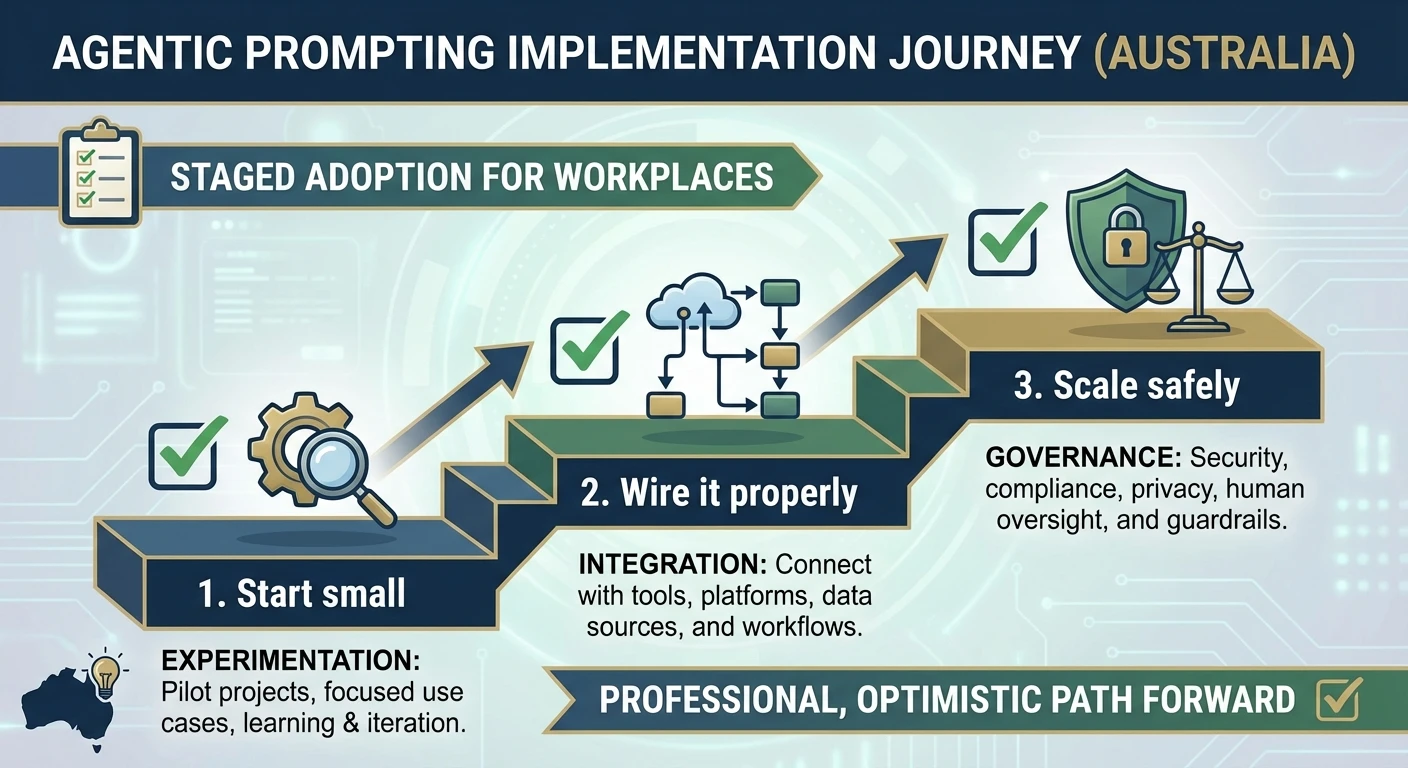
- Conclusion: Start small, wire it properly, then scale
Introduction: From clever chatbot to reliable co-worker

Most knowledge workers in Australia have now at least “played” with large language models at work. Surveys over 2024–2025 show this shift clearly: a February 2024 Salesforce report found that 53% of Australian professionals were already actively using or experimenting with generative AI at work. By August 2025, an EY survey reported that 68% of Australian workers were using AI, and a Tech Council of Australia report found that 84% of Australians in office jobs were using AI at work. On the business side, a 2024 Australian Industry Group survey showed that 52% of businesses reported some form of AI adoption, while a CSIRO report found that 68% of Australian businesses had implemented AI technologies. The hard question now is how to turn that experimentation into something people can rely on at work. That is where structured, agentic prompting starts looking like secure AI infrastructure for everyday tasks. The hard question is how to turn that into something people can rely on at work. That is where structured, agentic prompting starts looking like secure AI infrastructure for everyday tasks.
In this second part of our series, we move from ideas to implementation: how to build and roll out autonomous-style prompting workflows that own multi-step tasks, call tools, remember context, and self-check before acting. We unpack the technical composition of agent behaviour, show design patterns, share templates for daily and work routines, and outline platform and infrastructure choices for Australian organisations, drawing on practices in agentic AI workflows and the secure, privacy-focused approach we use at LYFE AI.
1. Core building blocks: planning, tools, and memory primitives
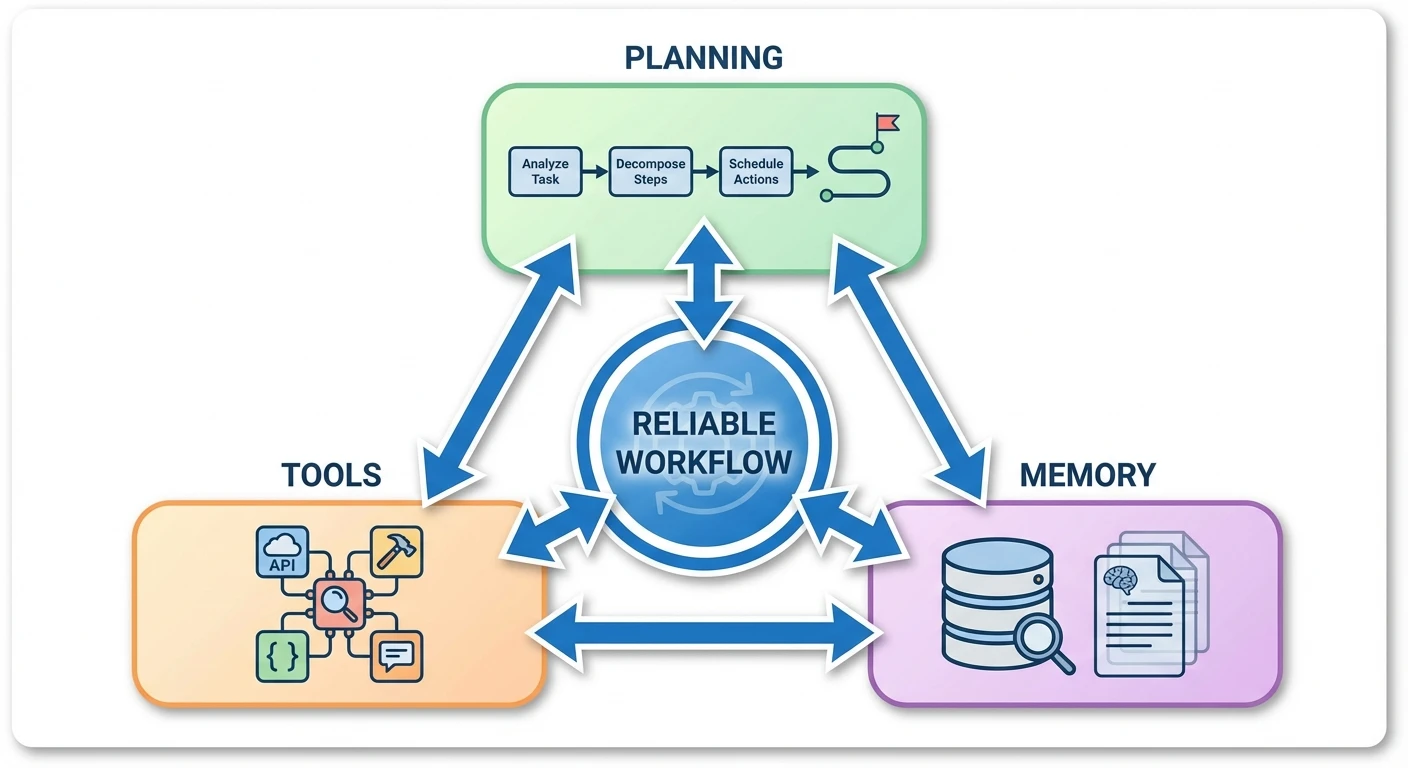
Think in terms of primitives: small, composable behaviours you can trust. In agentic prompting, the three key primitives are planning, tool use, and memory. Together, they turn “answer this question” into “own this workflow”, mirroring what agentic AI architecture describes as planning, acting, and learning cycles.
Planning means explicitly instructing the model to break a goal into sub-tasks, decide order and priority, and move through them step by step. A standard loop is: “Your objective is X. First, assess the situation. Second, plan the steps. Third, execute them one by one. Fourth, evaluate your result.” That “assess → plan → execute → evaluate” loop is a reusable primitive for reasoning and control, similar to structures in GitHub’s guidance on agentic primitives and context engineering.
Tool use is the second primitive. Instead of only generating text, the assistant is told which tools or APIs it can call, when, and why. Example: “You can call the calendar API to read and update events, the email API to draft but not send emails, and the CRM API to look up customer records. Choose tools as needed to complete the plan.” With that, the assistant interacts with real systems—email, CRM, project software—rather than pretending in free text, just as modern AI automation services do when integrating with business software.
Memory is the third primitive. For short tasks, “working memory” in the context window can be enough, but recurring routines need persistent memory: saved state across runs. Prompts like “Retain key decisions from each session; next time we meet, review them first and update your plan” specify what to remember and how to reuse it. Implementation might use vector stores, key–value stores, or databases; at the prompt layer you define what belongs in memory and when to read or write it.
These three capabilities—planning, tools, and memory—are ingredients you will reuse across every pattern in the rest of this article. Get them right in small sandboxes first, then scale, treating them as reusable components in broader agentic AI use cases.
2. Design patterns for powerful agentic prompts
With primitives in place, design prompts that consistently produce the behaviour you want. Think “prompt architectures” rather than single instructions: goal → constraints → tools → process → checks → memory, a sequence that matches patterns in no‑code agentic workflow guides.
Goal and constraints. Start with a clear, outcome-oriented brief. Example: “Act as my daily planner. Goal: organise my next workday to maximise deep focus and reduce context switching. Use my calendar API, task list tool, and email drafts. Respect my working hours (9–5) and do not schedule more than four hours of meetings.” This frames the assistant around outcomes and boundaries, similar to how custom AI automation workflows are tied to business results.
Explicit planning and chaining. Embed multi-phase instructions: “Think aloud in four phases: 1) Assess inputs, 2) Plan steps, 3) Execute steps one by one, 4) Evaluate your work and make one revision if needed. Show me your final answer only after the evaluation step.” This separates single-shot responses from multi-step routines that adapt as they go.
Memory and feedback. Treat them as first-class concerns. A scaffold could be: “At the end of each run, summarise what worked and what did not in 3–5 bullet points. Store those as ‘lessons’ in memory. At the start of the next run, review your last three lessons and adjust your plan accordingly.” This creates a lightweight feedback loop without a heavy MLOps stack.
Tool instructions and guardrails. For tools: “Use the calendar API for all scheduling tasks; do not invent events. If you need information that is not available, ask the user instead of guessing.” For guardrails: “If you are less than 80% confident about a critical action, stop and ask for confirmation. Never send an email without explicit user approval.” These elements turn an open-ended model into a disciplined planner–executor with bounded autonomy, echoing the risk-aware stance in security research on agentic AI.
3. Domain-specific templates for real workflows
Abstract patterns become real when grounded in domain templates. Below are examples for marketing, engineering, and legal work in an Australian context, similar to how agentic workflow case studies break down scenarios.
Marketing operations. “Goal: Improve performance of our AU paid social campaign. Step 1: Research current Australian search and social trends for our industry via the web tool. Step 2: Generate five new ad variants tailored to each audience segment. Step 3: Call the A/B testing API to allocate traffic and measure uplift. Step 4: If uplift is under 20%, design a new iteration and repeat once. Log all results and recommendations for the team.” This wires together research, generation, experimentation, and iteration, the same pattern used in professional AI assistants for marketing teams.
Engineering / DevOps. A debugging workflow might say: “You are a debugging assistant for our internal microservices. When an alert appears: 1) Ingest logs via the logging API, 2) Form 2–3 hypotheses about the root cause, 3) For each, design a small test using our staging simulator tool, 4) Run tests via the simulator API, 5) If one fix passes all tests and your self-evaluation, prepare a deployment plan and change summary for human review. Do not deploy directly.” This encodes a scientific-method loop plus tool use while keeping humans in the release path.
Legal and compliance. For Australian legal teams: “Goal: Review this supplier contract under the AU Privacy Act and our internal data-handling policy. 1) Parse the contract text. 2) Using the case law search tool and our policy database, identify clauses that may conflict with privacy or data residency requirements. 3) For each flagged clause, explain the issue and suggest compliant alternative wording. 4) Rate your confidence and halt if below 70%, asking for human input.” This combines regulatory awareness, risk flagging, and external database queries.
Variations of these templates can also power personal routines—morning check-ins that pull weather and health data, workday kick-offs that reconcile calendar and tasks, or evening reflections that analyse the day and adjust tomorrow’s plan. The pattern stays stable; you plug in domain-specific tools and policies, much like swapping different model choices into the same workflow.
4. Integrating agentic prompting into daily routines and workflows
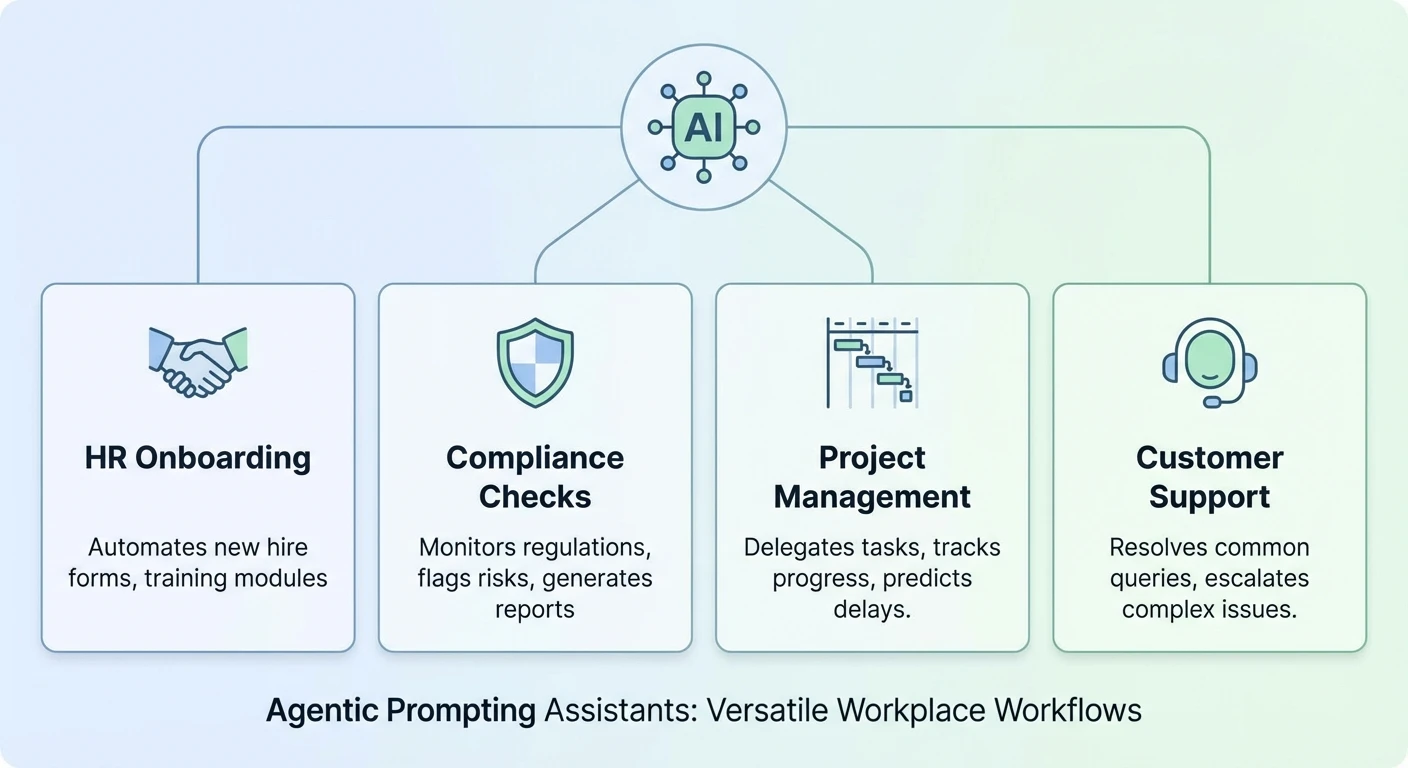
Building a clever prompt is one thing; fitting it into a team’s day is another. Integration starts by choosing the right candidate workflows: multi-step, data-heavy flows that are tedious but not catastrophic if something goes slightly wrong, matching early-focus areas from agentic AI risk assessments.
Good first candidates include meeting preparation, ongoing monitoring, research digests, and internal reporting. For example, an assistant might each morning pull your meeting list, gather relevant documents from a knowledge base, draft agendas, and propose follow-up tasks—all without sending any external email. This “inside the fence” use keeps risk low while proving value and can be orchestrated through automation-focused AI assistants.
Technically, the smoothest rollout is embedding agentic behaviour into tools people already use—email, calendar, chat, ticketing—by wiring prompt logic behind buttons, slash commands, or scheduled jobs. Every agentic run should log what it planned, which tools it called, and how long each step took so you can debug and refine behaviour.
For teams, consider multi-agent setups where different specialised assistants share work: one focuses on research and summarisation, another on orchestrating emails and calendar changes, a third on monitoring outcomes and suggesting improvements. Coordination can be managed via a shared queue or orchestration layer that passes tasks between them with clear boundaries.
In Australia, data sovereignty and privacy are central. If personal information, financial records, or identifiable employee data are involved, you may host models, logs, and tool integrations on Australian servers, or require vendors to offer AU-region data residency and configurable retention. Treat those decisions as part of workflow design, and reflect them in your AI usage terms and conditions.
5. Platforms, infrastructure, and Australian context
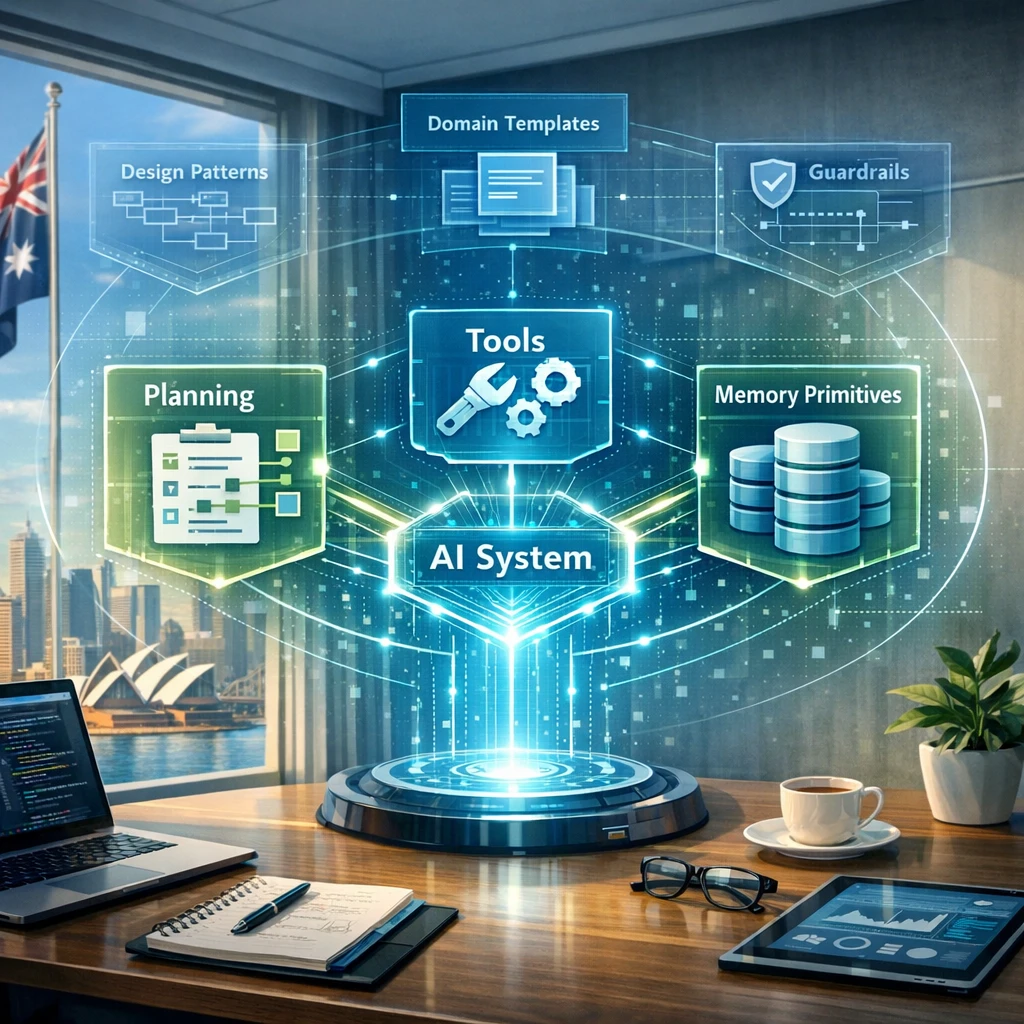
Behind the scenes, your agentic workflows need a home. At minimum you choose: a model provider, an orchestration layer, a memory store, and a tool/API integration surface. You can assemble these yourself or rely on platforms that bundle them, such as secure Australian AI assistants designed for workplace automation.
Models. You might use a major cloud provider’s foundation models, a specialised agent framework, or a mix. Key questions: can you control prompt templates centrally, monitor and log tool calls, and meet Australian data residency and privacy needs? Models. You might use a major cloud provider’s foundation models, a specialised agent framework, or a mix. Key questions: can you control prompt templates centrally, monitor and log tool calls, and meet Australian data residency and privacy needs? Many organisations prefer or are required to use AU-region data centres once they move beyond prototypes, especially when they start handling real customer or citizen data under the Privacy Act and sector-specific rules. Model-selection guides like our comparison of GPT‑5.2 variants and OpenAI O4‑mini vs O3‑mini help align capabilities with those constraints. Model-selection guides like our comparison of GPT‑5.2 variants and OpenAI O4‑mini vs O3‑mini help align capabilities with those constraints.
Orchestration. This is where planning primitives run. It might be a workflow engine, a dedicated agent framework, or a microservice that calls the model with structured prompts and interprets tool-call responses. Look for step-level retries, timeouts, parallel branches, and CI/CD hooks so workflows can be versioned like code.
Memory. Memory architectures usually combine short-term context in prompts with longer-term storage. A vector database helps semantic recall of documents or past interactions; a relational or key–value store can hold settings, user preferences, and “lessons learned” from previous runs. Keep the prompt instructions about memory simple—what to store, what to retrieve, and when—while letting infrastructure handle the mechanics, aligned with practical agentic workflow blueprints.
Tools and APIs. Tool integrations connect workflows to email gateways, calendar APIs, CRMs, HRIS, finance systems, and more. Use narrow, well-documented interfaces rather than broad system access. In many AU organisations, this means working with internal IT to define OAuth scopes, audit logs, and rate limits before scaling beyond pilots, and documenting these interfaces alongside your internal AI knowledge base or sitemap of implementations.
6. Guardrails, drift prevention, and feedback loops
More autonomy without constraints invites surprises. Guardrails bound behaviour so “initiative” does not become “unexpected side effects”. At the prompt level, they are rules about when to proceed, when to stop, and when to ask for help, reflecting risk themes in security-focused discussions of agentic AI.
Approval checkpoints. Embed them for high-impact actions: “Before sending any email or committing any change to a production system, pause and present a summary plus the exact action you plan to take. Wait for an explicit ‘approve’ signal from the user.” Tune which steps require sign-off and which can be auto-executed.
Confidence thresholds. You can instruct: “Estimate your confidence for each conclusion on a 0–100% scale. If confidence is below 80% for a decision that affects money, legal risk, or people, halt execution and surface your reasoning for review.” Model confidence is imperfect but still filters out some low-certainty actions.
Scope limitation. Instead of broad access to “the CRM”, grant a single constrained API like “lookup customer details by ID” or “draft but never send emails”. In the prompt: “You may only use the following tools and only for the described purposes. If you think you need more access, ask the user; do not attempt workarounds.” Clear scope plus narrow tools limit damage from errors or unexpected behaviour, a pattern we embed in enterprise-grade Lyfe AI deployments.
Drift prevention and evaluation. Pair logs with regular review. After each run, summarise the goal, steps taken, tools called, problems, and improvements. Feed these summaries into a meta-prompt such as: “Review the last 20 runs and suggest three prompt or tool changes that would reduce errors or delays.” Keep humans in the loop to approve changes before merging them into main workflows. For sensitive contexts—financial decisions, legal conclusions, HR workflows—maintain human oversight and full auditability, consistent with how modern agentic workflow frameworks treat observability.
7. Practical implementation checklist and tips
To turn these ideas into action, adapt the checklist below inside your organisation, or pair it with Lyfe AI implementation services for support.
- Pick one workflow, not ten. Choose a multi-step, low-to-medium-risk process like meeting preparation, research digests, or internal reporting. Map the current steps before writing prompts.
- Define the goal and constraints first. Describe: “The assistant should do X, within Y boundaries, using Z tools.” Then add planning instructions (assess → plan → execute → evaluate).
- Wire in tools with narrow scope. Expose only what is necessary: read-only calendar, draft-only email, read-only knowledge base search. Use sandbox or test accounts in early trials.
- Add working memory and simple long-term memory. Start with a brief “lessons learned” summary stored per run and loaded next time. Expand only after you see what is useful to recall.
- Embed guardrails from day one. Require approval for anything user-facing, set confidence thresholds, and clearly state “stop and ask” conditions.
- Log, review, and iterate. Capture traces of the model’s plan, tool calls, and outputs. Weekly, sample runs, score them against your criteria, and adjust prompts, tools, or memory instructions.
- Only then, expand. Once one workflow is stable, reuse patterns—prompt structure, guardrails, tools—into adjacent processes, tailored to each new context.
Keep communication clear with users. Explain what the assistant will and will not do, how to escalate issues, and how feedback is used. Treat early deployments like beta features while you trial different underlying models and pricing profiles.

Conclusion: Start small, wire it properly, then scale
Agentic prompting workflows rely less on magic prompts and more on careful wiring: planning primitives, well-scoped tools, sensible memory, and clear guardrails. Combined, they move you from one-off answers to dependable routines that share the load with human teams, as described in many agentic AI implementation playbooks.
To move from experiments to production, pick one candidate process, apply the patterns in this guide, and treat the first month as a learning sprint. Part 3 of this series will dive into safety, fairness, and compliance in more depth, especially for Australian workplaces handling sensitive data and high-stakes decisions.
To explore how LYFE AI can help you design, implement, and operate these agentic prompting routines in your own stack, get in touch with our team, bring a real workflow to the table, and co-design the first version together as part of our professional AI services and automation offerings.
Frequently Asked Questions
What is an agentic prompting assistant in the workplace?
An agentic prompting assistant is an AI system that can plan, sequence, and execute multi-step tasks using tools, memory, and structured prompts, rather than just answering one-off questions. In a workplace, it behaves more like a digital co-worker that can follow policies, interact with systems, and complete workflows reliably within defined boundaries.
How do I start designing an agentic prompting assistant for my team?
Begin by mapping a specific workflow you want to improve, including inputs, decision points, tools, and approvals. Then define the assistant’s role (what it can and cannot do), set up planning primitives (step-by-step reasoning structures), connect it to the right tools and data sources, and test it with a small pilot group before scaling.
What are the core building blocks of an agentic prompting system?
The main building blocks are planning (how the assistant breaks tasks into steps), tools (APIs, internal systems, and data sources it can call), and memory (how it stores and reuses context across sessions). Around these you layer policies, templates, and guardrails so the system stays aligned with your processes and risk appetite.
How can I integrate an agentic AI assistant into daily workplace routines?
You integrate it where people already work: email, chat (like Teams or Slack), CRM, ticketing tools, or document systems. Start with clear entry points, such as “draft a client response” or “prepare this report,” then wire the assistant to trigger from those contexts and hand its outputs back in a format your team can easily review and approve.
What are some practical design patterns for agentic prompting in business?
Common patterns include planner–executor (one prompt plans, another executes steps), checker–doer (one agent performs a task and another reviews for quality or compliance), and retrieval-augmented workflows (the assistant fetches relevant internal documents before acting). These patterns reduce errors, make behavior more predictable, and are easier to audit and improve over time.
How do domain-specific templates help with agentic prompting assistants?
Domain-specific templates encode the language, constraints, and steps for a particular function, like HR onboarding, finance approvals, or customer support. They allow you to reuse a proven structure while swapping in your own policies, data sources, and tools, which speeds up deployment and keeps outputs consistent with your organisation’s standards.
What should Australian organisations consider when choosing platforms for agentic AI assistants?
Australian teams should consider data residency options, how the platform handles privacy and security, and whether it supports compliance with Australian regulations and industry standards. It’s also important to check how easily it integrates with your existing systems (Microsoft 365, Google Workspace, CRMs) and whether it supports monitoring, audit logs, and governance controls.
How do I put guardrails and compliance controls around an agentic prompting assistant?
You can add guardrails by restricting which tools and data the assistant can access, encoding policies directly into prompts, and using role-based access for sensitive actions. Pair this with monitoring (logs and dashboards), feedback loops (user rating and error reporting), and periodic reviews to catch drift from expected behaviour and update templates as regulations or policies change.
How is this different from just using ChatGPT or a basic chatbot at work?
A basic chatbot answers isolated questions, while an agentic prompting assistant is designed around your workflows, tools, and compliance requirements. It follows structured processes, keeps context across steps, integrates with business systems, and operates within defined guardrails so it can be trusted for repeatable, business-critical tasks.
How can LYFE AI help my organisation implement agentic prompting assistants?
LYFE AI helps you move from experimentation to production by mapping your workflows, designing agentic prompt architectures, and integrating them with your existing tools and infrastructure. They focus on Australian context, including security and compliance requirements, and provide templates, governance frameworks, and ongoing support to keep your assistants reliable over time.