
Why debugging prompts matters for real work with AI
Picture this: a Sydney ops lead asks an AI assistant to draft a new onboarding process. The answer looks polished, but when the team tries to use it, key steps are missing and one policy reference is wrong. People quietly stop trusting the tool. It becomes “that thing we try when we’re bored”, not a real part of the workflow.
That gap—between shiny demo and dependable everyday use—is rarely about the model alone. It is usually about the lack of a systematic way to debug prompts, measure what’s working, and steadily improve both, which is exactly what modern AI implementation services focus on. Without that discipline, AI assistants feel like dice rolls: sometimes brilliant, sometimes clearly off, and no one can explain why.
This article shows how to turn that chaos into a process: step‑by‑step troubleshooting, prompt‑based self‑critique, simple metrics, and fixes for common failure modes like hallucinations and rambling outputs, drawing on practices similar to those in industry prompt‑engineering guidelines. The lens is practical and technical—aimed at AU teams who are already experimenting and now want assistants that behave more like production systems than party tricks.
Step‑by‑step troubleshooting for bad AI answers
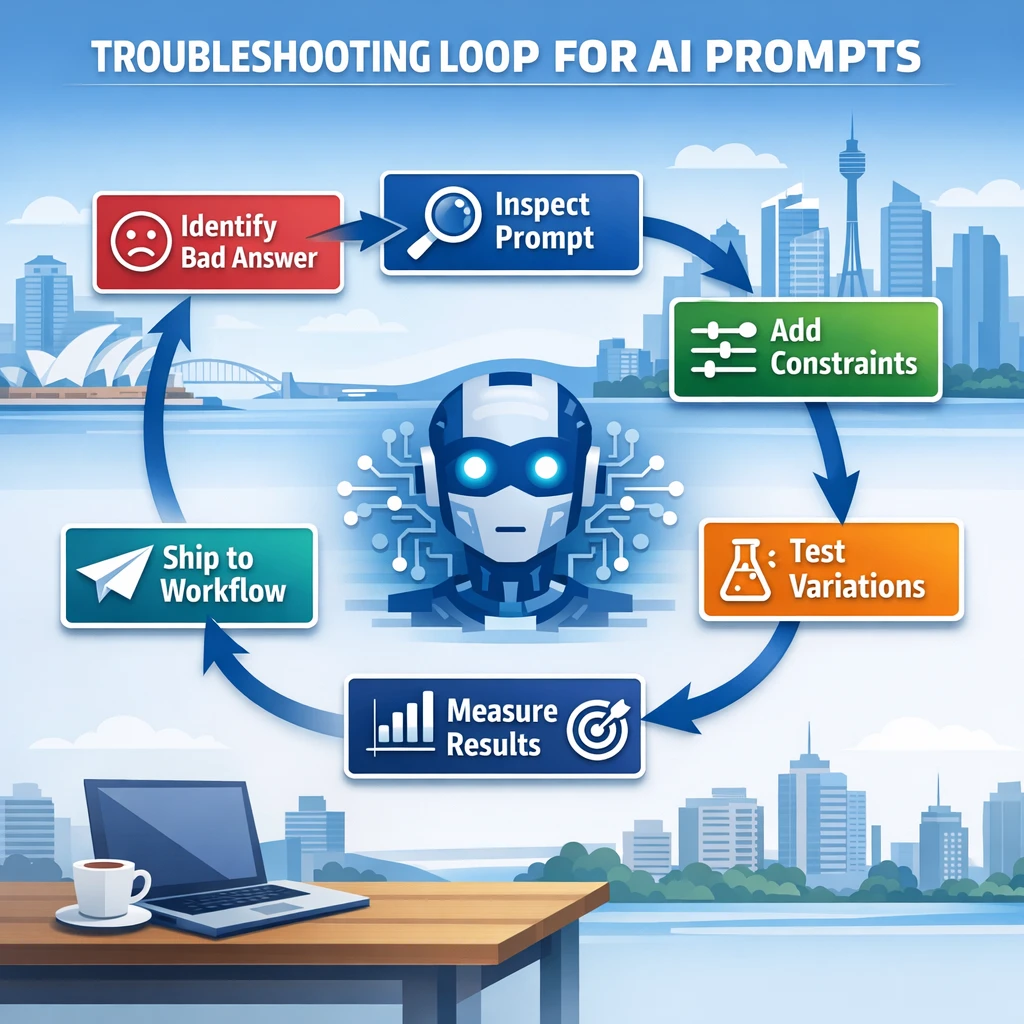
When an answer is wrong or weak, people often rewrite the prompt from scratch or give up and do the task manually. A better approach is to treat each bad output as a test failure you can diagnose, much like the debug loops in prompt‑engineering best‑practice playbooks.
A simple troubleshooting template:
- Capture the failed attempt. Copy the full prompt and the AI’s answer into a new message so you can see exactly what happened.
- List concrete problems. Be specific: “cited a law that does not apply in NSW”, “ignored step 3 of the instructions”, “invented a source”, “too generic for a fintech use case”.
- Ask the model to explain what went wrong. Paste the original answer and your problem list, then ask: “Review this response. For each problem I’ve listed, explain what is wrong and why it likely happened based on my original prompt.”
- Request a corrected version with constraints. Then say: “Now produce a corrected version that addresses each problem. Explicitly note where you had to make assumptions.”
- Surface remaining uncertainties. Finish with: “List any remaining uncertainties or questions you would need me to answer to improve this further.”
This forces you to articulate what “good” looks like, teaches the model from concrete feedback, and exposes missing context the next prompt should include. A Melbourne employment lawyer, for example, might realise the prompt never specified jurisdiction, so the model mixed AU and US references.
Over time, keep a small collection of these “before → critique → after” threads for common tasks. They become mini case studies you can reuse when building more robust workflows or onboarding staff into AI‑assisted processes, including internal tools such as AI IT support for Australian SMBs.
Self‑critique patterns that turn the model into its own reviewer
Meta‑prompting—asking the assistant to analyse and improve its own work—is one of the fastest ways to move from hit‑and‑miss answers to structured, reviewable outputs, echoing resources like The Art of Prompt Engineering. Instead of treating each response as final, you add a review step inside the conversation.
A simple two‑phase pattern:
- Phase 1 – Draft. “First, produce your best‑effort answer to the task.”
- Phase 2 – Self‑critique. “Then, in a section titled ‘Self‑Review’, identify at least three weaknesses or risks in your answer, explain why they matter, and propose specific corrections.”
For higher‑risk work (legal, medical, financial—always with a human expert as final reviewer), add:
- Flag any claims that rely on information you do not have. However, some experts argue that insisting on an “always with a human expert as final reviewer” rule for every high‑risk use case may be too rigid and could slow down access to beneficial AI services, especially in under‑resourced or time‑critical environments. In practice, many Australian frameworks focus less on a blanket human sign‑off for every AI output and more on proportional, risk‑based safeguards—things like robust validation, clear accountability, audit trails, and escalation paths when an AI decision is contested or falls outside expected parameters. From this angle, the key isn’t that a human expert reviews every single AI‑assisted recommendation, but that organisations can demonstrate appropriate human oversight, explainability, and recourse for users when something goes wrong. That nuance matters: it leaves room for automation where risk is lower or well‑controlled, while still aligning with the broader push for safety, transparency, and accountability in high‑stakes domains.
- Label key factual statements with confidence (low/medium/high).
- Clearly separate facts from model assumptions.
The same approach is powerful for code and data analysis. A Brisbane data engineer might say: “After writing the SQL query, perform a self‑check: describe edge cases, potential performance issues, and how you would test the query on a sample dataset.” The assistant now produces code and a test plan, like an embedded reviewer inside an AI personal assistant.
Self‑critique does not make the model perfect, but it gives you a visible review artefact you can quickly scan instead of trusting a single block of text with no sign of doubt. For implementers building workflows, that second layer is often what convinces risk or compliance teams to accept AI in the loop.
Metrics and simple experimentation to assess prompt performance
Prompt work often feels like tweaking wording until it “seems” better. To move beyond gut instinct, you need light‑weight metrics and basic experiments—enough structure to see whether version B is truly better than version A, as emphasised in IBM’s prompt engineering overview.
For individuals, track a few simple measures:
- Accuracy rate. Out of 10 tasks, how many outputs are usable without major rewrites?
- Relevance rating. Score each answer 1–5 for “actually solves my task”.
- Prompt efficiency. How many back‑and‑forth turns until you get a satisfactory answer?
- Time to result. Rough minutes from first prompt to “ready to ship”.
For teams and businesses, add:
- Cost per completed task (if you track usage at scale).
- Rework rate: how often humans must significantly fix AI outputs.
- Operational KPIs tied to the workflow: support handling time, proposal turnaround, campaign response rates, etc.
With those measures, you can run basic A/B tests:
- Define a clear task—e.g. “Summarise this customer feedback thread into a 10‑bullet brief for an Australian SaaS product manager”.
- Create two or three different prompts for that task.
- Run each prompt on the same model and same input data.
- Blindly review outputs and score them on accuracy, usefulness, and editing effort.
- Pick the best performer and iterate from there.
Early on, you do not need code—just a spreadsheet and saved transcripts. Once a pattern proves itself, embed that prompt into a tool your team already uses, such as your knowledge portal, a reporting template, or as part of a broader GPT‑5 migration and optimisation strategy.
Prompt fixes for hallucinations, off‑topic replies, and verbosity
Most frustrations with AI assistants fall into a few patterns: the model makes things up, drifts away from the task, or talks far more (or less) than you need. Each has direct prompt‑level fixes you can standardise across your organisation, especially when building long‑term AI partner workflows.
1. Reducing hallucinations and made‑up facts.
When factual accuracy matters, constrain the model’s reference frame:
- Tell it to rely only on the information you provide.
- Encourage “I don’t know” when information is missing.
- Require sources or citations next to key factual claims.
- Ask for simple confidence labels for important assertions.
More advanced setups pair prompts with retrieval‑augmented generation (RAG), where the system fetches internal documents and the model is instructed to answer from that context only. Industry players highlight this as a way to keep outputs anchored in vetted source material, especially on company‑specific topics. Even without full RAG infrastructure, the “context only + I don’t know” pattern often provides a big improvement.
2. Preventing off‑topic or shallow responses.
Vague prompts invite vague answers. To keep responses focused:
- Clearly narrow the scope (“Only analyse the last 20 lines of this chat transcript”).
- Use delimiters like triple quotes to mark the exact input.
- Specify depth and audience (“Explain as if to a Year 10 student interning at a Perth logistics company”).
- Use an iterative pattern: clarify, then plan, then execute, instead of jumping straight to the final answer.
3. Controlling verbosity and structure.
When the model rambles, set hard boundaries:
- Define length limits (“max 200 words”, “5 bullet points only”).
- Specify structure (“Use headings: Background, Analysis, Recommendation”).
- Ask for a short summary first, then detail only if needed.
For ongoing support bots, also specify tone and repetition: “Respond in a warm but concise style. Do not repeat the same reassurance more than once. Vary your phrasing across messages.” Over many interactions, these constraints make the assistant feel less robotic and align with the patterns in best‑practice AI prompt guidelines.
Immediate quick‑win actions for individuals and AU businesses

Turning AI from a novelty into a dependable work tool does not require a long transformation program. A few simple changes, applied consistently, can upgrade results for solo professionals and teams, especially when paired with solutions like AI transcription for clinicians or secure AI transcription implementations.
For individuals—policy analysts, designers, students—try this week:
- Add an automatic clarification step. End prompts with: “If anything is unclear, ask up to three questions before you answer.”
- Require sources for factual claims. For law, health, or finance: “Cite your sources and explicitly say ‘I’m not sure’ when the information is uncertain.”
- Save your best prompts. Any time a conversation produces a great output, capture the prompt in a note tool and label it by task: “short LinkedIn bio”, “customer email reply”, “Python debugging”.
- Track two metrics. Prompts per task and editing time. If those fall over weeks, your prompt practice is improving.
For businesses, the quick wins are about coordination:
- Form a small cross‑functional working group. Include operations, IT, and a frontline team (sales, support, or service). Their mandate: share what is working or failing and which prompts are worth standardising.
- Start a shared prompt library. Use a simple wiki or doc. Group snippets by task—customer replies, internal reporting, dev assistance—and note what metrics improved.
- Define safety and compliance patterns. For example, enforce “I’m not a lawyer; check with your legal team” where needed, or restrict outputs in regulated areas unless a human expert is in the loop.
- Pick a small set of high‑leverage use cases. e.g. proposal drafting for a mining supplier in WA, patient communication templates for a GP clinic in VIC, or grant applications for a regional council. Focus experimentation there first and measure the effect.
These actions are modest enough for conservative environments yet strong enough to show tangible change within a quarter. The goal is to prove that structured prompt work improves real‑world outputs, a pattern that underpins many AI‑enhanced teaching and training workflows.
Domain‑specific prompt snippets for business teams
Abstract advice is useful, but concrete snippets make it easier to start. Below are example prompts for common Australian business contexts. Adjust company names, regulations, and data sources to your setting, or incorporate them into your AI‑powered services portfolio.
Customer support – SaaS company

Task: Turn a messy support thread into a clear internal summary plus a customer‑ready reply.
You are assisting the support team of an Australian SaaS company.

INPUT:
- Full customer email thread is between triple quotes.
- Our product is <brief description>.
- The customer is based in <state/territory>.

TASKS:
1. Internal summary for our support system (max 150 words):
   - Root cause (best guess, with confidence).
   - What we have already tried.
   - Any promised follow-ups or deadlines.

2. Customer reply email:
   - Plain, respectful tone.
   - Australian spelling.
   - Do not promise legal or financial outcomes.
   - Keep under 200 words.

CONSTRAINTS:
- If any information is missing, list your questions at the end.
- Do not invent product features we do not explicitly mention.

Customer thread:
""" <paste thread> """
Compliance‑aware marketing – professional services
Task: Draft a marketing email for an accounting firm without straying into regulated financial advice.
You are helping an accounting firm in Australia draft an email to existing clients.

GOAL:
- Promote our new tax planning webinar.
- Stay clearly within general information, not personal financial advice.

STEPS:
1. Ask up to 5 clarification questions you need about:
   - Target client segment
   - Webinar content
   - Brand tone

2. Draft the email:
   - Subject line options (3).
   - Body copy (max 180 words).
   - Clear disclaimer that this is general information only and clients should seek personal advice.

CONSTRAINTS:
- Use Australian spelling and refer to relevant tax year correctly.
- Do not mention returns or outcomes that cannot be reasonably supported.
- If you're unsure about any legal boundary, flag it in a separate "Risk Notes" section.
Internal analytics – operations team
Task: Turn raw bullet points about operational issues into a concise briefing for an ops manager.
You are supporting the operations team of a mid-sized logistics company in Australia.

INPUT:
- Bullet points from today's stand-up meeting between triple quotes.

TASK:
1. Group the points into themes: people, process, technology, external factors.
2. For each theme, identify:
   - The core problem(s).
   - Suggested next actions (no more than 3 per theme).
3. Produce a one-paragraph executive summary (max 120 words) suitable for our COO.

CONSTRAINTS:
- If you need more context to suggest actions, clearly state assumptions.
- Avoid jargon; write as if to a new manager who has just joined from another industry.

Stand-up notes:
""" <paste notes> """
These snippets bake troubleshooting ideas directly into templates: clarification questions, explicit constraints, and clear output structures. Over time, your prompt library becomes a quiet but powerful asset: a set of battle‑tested ways to make the most of AI without reinventing the wheel, particularly when deploying AI support assistants across Australian SMBs.
Next steps: turning experiments into a repeatable AI practice
Moving from unreliable answers to stable, production‑ready workflows is about habits, not secrets. Diagnose failures instead of discarding them. Use self‑critique to expose weaknesses. Measure what matters. Apply targeted fixes for hallucinations, drift, and verbosity. Start small, capture wins, and share them, just as you would when rolling out a strategic AI partner across your organisation.
As you do this, you will discover which prompts are worth standardising and which tasks need heavier solutions like custom tooling or deeper integrations. The key shift is to stop treating every AI interaction as a one‑off experiment and start building a body of knowledge.
If you have worked through this piece and earlier parts in the “Prompt Engineering Assistants: From Fundamentals to Enterprise‑Grade Practice” series, your next step is clear: pick one real workflow in your Australian context, apply the troubleshooting and measurement patterns here, and document the results. Then refine, share, and repeat. That is how assistants stop being a novelty and start becoming quiet infrastructure, whether you are optimising secure AI transcription pipelines or planning ahead for next‑generation GPT‑5 capabilities.
Frequently Asked Questions
What is prompt debugging and why does it matter for AI assistants in my business?
Prompt debugging is the process of systematically finding and fixing why an AI assistant is giving wrong, incomplete, or inconsistent answers. Instead of randomly rewriting prompts, you isolate the failure (e.g. missing context, vague instructions, wrong format), test targeted changes, and measure whether results improve. This matters because it turns AI from a flashy demo into a dependable tool that your team can actually trust in daily workflows.
How can I systematically troubleshoot bad AI answers instead of just rewriting the prompt every time?
Start by classifying what went wrong: was the answer factually wrong, off‑topic, missing detail, too long, or not in the right format? Then change one variable at a time—such as adding domain context, tightening constraints (length, tone, structure), or providing examples—and re‑run the same test cases. Log the prompt version, inputs, and outputs so you can compare results over time instead of guessing what helped.
How do self‑critique prompts work to make AI more reliable?
Self‑critique patterns ask the model to first draft an answer, then review its own work against explicit criteria before giving you the final response. For example, you can tell the assistant to check for policy conflicts, missing steps, or unsupported claims and revise accordingly. This effectively turns the model into its own reviewer, catching a portion of errors that would otherwise slip through in one‑shot responses.
What simple metrics can I use to measure whether my prompts are actually improving?
Use a small, fixed set of real‑world test inputs and rate outputs on dimensions like accuracy, completeness, format adherence, and usefulness to your team. You can start with a 1–5 scale for each dimension and track averages per prompt version. Over time, this gives you a clear picture of whether a new prompt or configuration truly reduces errors or just feels better anecdotally.
How do I reduce AI hallucinations and wrong facts in my assistant’s answers?
Constrain the assistant to specific, trusted sources (like your policies or knowledge base) and tell it explicitly to say “I don’t know” when information is not available in those sources. Use retrieval‑augmented prompts that show the model the relevant snippets and instruct it to only answer from those. You can also add a self‑check step where the model flags statements that are speculative or not grounded in the retrieved content.
How can I stop my AI assistant from giving long, rambling answers and make it more concise?
Set clear output constraints directly in the prompt, such as word or sentence limits, bullet‑point formats, or ‘executive summary first, detail second’ structures. You can also include examples of good, concise outputs and penalise verbosity in your evaluation metrics. Over time, reusing these structured prompt patterns as templates helps your team get consistently focused responses.
What are some quick wins to get more reliable AI outputs for my Australian business today?
Create a small library of reusable, role‑specific prompts (e.g. for HR, operations, marketing) that include your Australian context—local laws, standards, and terminology. Add a simple review checklist to each prompt, like “check for AU spelling, ATO references, and local compliance requirements” and make team members run key outputs through that. Even these light processes dramatically reduce obvious errors and build trust in the assistant.
How can different business teams use domain‑specific prompt snippets effectively?
Give each team short, copy‑pasteable prompt blocks that embed their key rules, data sources, and output formats. For example, HR might have snippets that reference specific onboarding policies, while finance uses ones tied to Australian tax and reporting standards. By standardising these snippets, you avoid every staff member reinventing prompts and get more consistent, domain‑aware answers across the business.
What does a repeatable AI prompt engineering practice look like in an organisation?
A repeatable practice means you have documented prompt templates, clear evaluation criteria, a basic experiment log, and ownership for maintaining them. Teams regularly test new prompts on agreed scenarios, compare performance, and retire weaker versions. Over time, this turns your AI assistant into a managed asset—much like software—rather than a collection of ad‑hoc chat sessions.
How can LYFE AI help my company build production‑ready AI assistant workflows?
LYFE AI works with technical and business teams to design, test, and operationalise prompt patterns tailored to your workflows and Australian regulatory context. They help you set up systematic troubleshooting, evaluation metrics, and prompt libraries so assistants behave predictably in production. This includes turning one‑off experiments into governed, auditable AI processes that scale across teams.