
Table of Contents
- Introduction: Why Context Engineering Matters Now
- 1. Context Engineering vs Prompt Engineering: Clear Definitions
- 2. System-Level Context Engineering Workflow and Pipelines
- 3. Prompt Engineering Use Cases vs Context Engineering for Production
- 4. Key Techniques in Context Engineering & Typical Pitfalls
- 5. Scaling From Prompt-Only to Context-Engineered Production Agents
- 6. Measuring Context Engineering Quality, Reliability, and Hallucinations
- 7. Context Engineering in Everyday Knowledge Work and Chatbots
- Practical Playbook: How to Start Context Engineering in Your Organisation
- Conclusion & Next Steps with LYFE AI
Context Engineering vs Prompt Engineering: The New Playbook for Production AI
-
1. Context Engineering vs Prompt Engineering: Clear Definitions
-
5. Scaling From Prompt-Only Experiments to Production Agents
-
6. Measuring Quality: Metrics, Reliability, and Hallucinations
-
Practical Playbook: How to Start Context Engineering in Your Org
Introduction: Why Context Engineering Matters Now
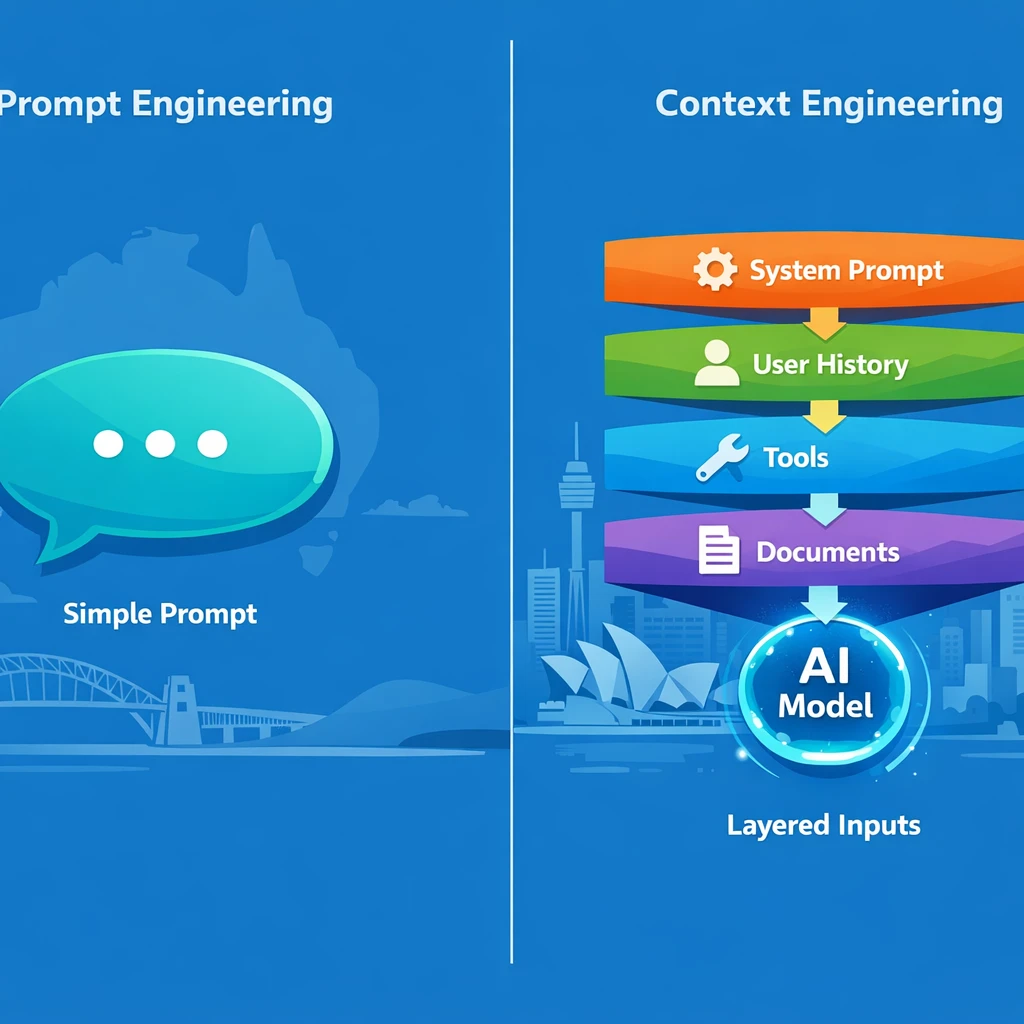
If you’re building with large language models today, you’ve probably heard the phrase “prompt engineering” so often it’s starting to lose meaning. But as soon as you move from a clever demo to a serious AI assistant, something else takes over: context engineering. And that shift is not just semantic; it’s architectural.
For LYFE AI and teams like yours in Australia, the difference is critical. Prompt engineering focuses on the words you type into the model. Context engineering designs everything the model sees before it answers—system prompts, user history, retrieved documents, tools, output schemas, the lot. It is the backbone of reliable, production‑grade AI and underpins services like AI IT support for Australian SMBs that must work consistently in real environments.
In this guide, we’ll unpack what context engineering actually is, how it relates to prompt engineering, and when each approach makes sense. However, some experts argue that calling it *the* backbone of production‑grade AI is oversimplified. Reliable AI in the wild doesn’t just depend on clever context design; it also relies on solid data pipelines, MLOps, observability, governance, and the right cloud and security foundations—many of which Australian SMBs are still building out. In that sense, context engineering is a critical layer that helps AI behave predictably at the interface with users, but it sits alongside, rather than above, these other core capabilities. Without that broader stack in place, even the best‑crafted context won’t fully deliver the consistency and trust that real‑world AI IT support demands. We’ll walk through real workflows, common failure modes, and a practical roadmap you can apply whether you’re building a customer‑facing agent, an internal HR bot, or a smart assistant for your data team. By the end, you’ll know how to move from “crafting the perfect prompt” to designing the system that chooses the right context every time—a shift that leading practitioners increasingly refer to as context engineering as a core AI skill.
1. Context Engineering vs Prompt Engineering: Clear Definitions
Let’s start with precise definitions, because a lot of confusion comes from people using the same words for different ideas. For an LLM, “context” is everything the model sees before it generates the next token: your system prompt, the current user query, chat history, long‑term memory, retrieved documents (via RAG), tool definitions, and even output schemas. Context engineering is the systems‑level practice of designing, curating, and assembling that entire information flow before each call, as highlighted in several industry deep dives on going beyond prompt engineering and RAG.
Prompt engineering, by contrast, operates at the text level. It’s the craft of writing and tuning instructions, examples, and formatting guidelines inside that context window. You decide tone, role, step‑by‑step reasoning hints, maybe some few‑shot examples. Prompt engineering implicitly assumes someone has already made good choices about what information is available. Context engineering is the discipline that makes those choices explicit—and repeatable across thousands or millions of calls, echoing the distinction drawn in resources comparing context engineering vs prompt engineering.
One helpful way to frame it: prompt engineering is usually per request; context engineering is per system. Prompt engineers tweak a specific prompt for a specific task. However, some experts argue that the line between prompt engineering and context engineering is already blurring in practice. In many real-world systems, prompts aren’t just hand-tuned per request—they’re versioned, templatized, and reused across flows, while context pipelines are often adjusted at a very granular task level. From that view, both disciplines operate at multiple layers of abstraction: prompts can be system-level assets baked into products, and context strategies can be selectively applied per use case or even per user. Rather than a clean per-request vs. per-system split, it may be more accurate to think of prompt and context engineering as overlapping capabilities along a spectrum of control, with teams continuously iterating on both as the system learns and scales. Context engineers build pipelines that pull the right data, compress the right history, attach the right tools, and then drop a parameterised prompt on top. In production, prompt engineering becomes a subset of context engineering: you can write clever prompts without context pipelines, but you can’t build robust context pipelines without solid prompts baked in, which is why guides such as Mastering AI prompts remain highly relevant.
This is why most modern AI stacks—whether you’re using hosted assistants or custom APIs—are moving toward context‑centric design. Prompts still matter, but they ride on a much larger system that governs what the model sees and when, a pattern mirrored in emerging best‑practice playbooks for context‑aware systems.
2. System-Level Context Engineering Workflow and Pipelines
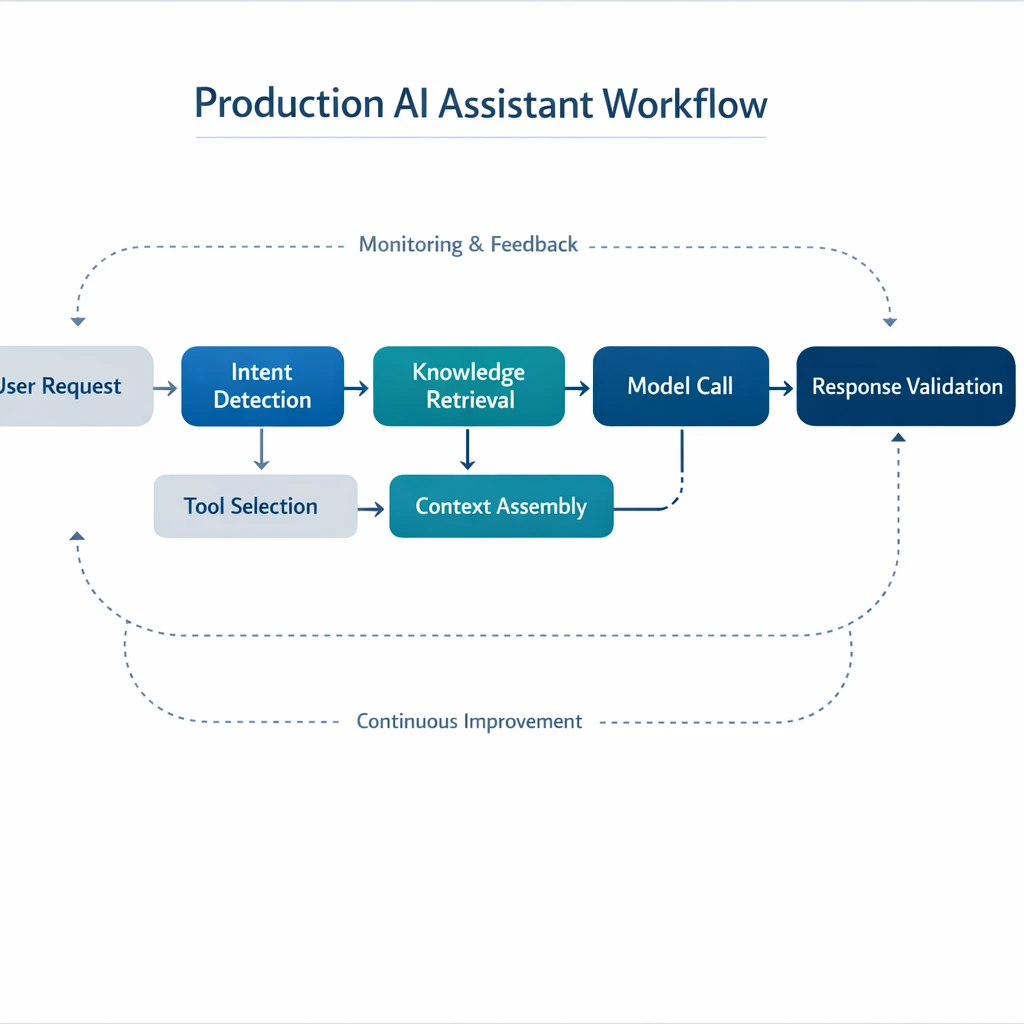
To understand context engineering in practice, it helps to picture an end‑to‑end pipeline. Every time your assistant responds, it’s not “just a prompt”; it’s a carefully assembled bundle of messages, tools, and metadata. A typical context‑engineered call looks like this:
-
Load a base system prompt – This defines role, rules, jurisdiction (e.g., AU law), safety, and style.
-
Assemble conversation history – Usually only recent turns, sometimes summarised to save tokens.
-
Fetch long‑term memory – User profile, prior decisions, project notes, past outputs.
-
Run retrieval (RAG) – Pull top‑k relevant documents from your knowledge bases or vector stores.
-
Attach tools/functions – With clear descriptions, argument schemas, and usage constraints.
-
Include an output schema – For JSON responses, UI layouts, or other structured formats.
-
Assemble and send – Order everything for maximum clarity, then call the model.
You can summarise this as: User query → Retrieve → Filter/Rank/Compact → Assemble (prompt + context + tools) → Model → Response + state update. The job of the context engineer is to tune each stage: which indices to query, how many documents to include, how aggressively to summarise, how to tag data by jurisdiction or department, and how to keep global policies always present even when history is trimmed.
In real systems, you don’t do this once. You run this workflow on every turn. That’s why treating context engineering as a first‑class discipline matters: small design decisions (like chunk size, ranking strategy, or which memories are eligible for retrieval) have compounding effects on accuracy, cost, and user trust. Prompt tweaks can only paper over those choices for so long, which is why effective context engineering for AI agents emphasises robust pipelines rather than one‑off prompt fixes.
3. Prompt Engineering Use Cases vs Context Engineering for Production
So when is simple prompt engineering enough? There are cases where you don’t need a full context pipeline. One‑shot or few‑shot tasks with short inputs fit this pattern: rewriting a paragraph, drafting a social caption, doing a small code fix, or answering a question about a single pasted policy PDF. Here, a well‑crafted prompt plus the user input often delivers strong results. You might tune the wording, add examples, and you’re done.
Things change the moment your use case becomes multi‑turn, data‑rich, or long‑lived. Imagine a customer support assistant for an Australian SaaS product. Users expect it to remember past issues, respect AU privacy rules, and answer from the latest knowledge base, not a month‑old FAQ. A static prompt—no matter how clever—cannot:
-
Pull account details from your CRM
-
Check the user’s current subscription and entitlements
-
Fetch AU‑specific policy snippets and Fair Work‑aligned HR rules
-
Recall a ticket from three weeks ago where you promised a workaround
In these cases, you need context engineering: retrieval for docs and tickets, memory for prior chats, and tools for real‑time account data. The same is true for internal assistants that analyse multiple spreadsheets then draft a memo, or AI copilots that sit across your Google Workspace or Microsoft 365 content. Without proper context engineering, the assistant starts hallucinating, forgetting, or giving US‑centric answers to Australian employees, making offerings like AI personal assistants for business users far less useful.
A useful rule of thumb: if setup time must be under about a week and you’re fine with a disposable prototype, lean on prompt engineering. However, some experts argue that this undersells how robust modern foundation models already are out of the box. For many day‑to‑day workflows—summarising meetings, drafting emails, or generating first‑pass analyses—generic prompts and light configuration can deliver plenty of value without a heavy context‑engineering lift. They also point out that strong prompt design, guardrails, and evaluation can mitigate a lot of hallucinations and cultural bias before you ever plug in retrieval, memory, or tools. In that view, context engineering is a powerful accelerator and a requirement for truly high‑stakes, deeply personalised use cases, but not a hard prerequisite for AI assistants to be useful or trustworthy for business users. If the use case involves ongoing conversations, critical decisions, or multiple data sources, treat prompt engineering as 20% of the puzzle and context engineering as the other 80%—a framing echoed in comparisons of prompt vs context engineering in production systems.
4. Key Techniques in Context Engineering & Typical Pitfalls
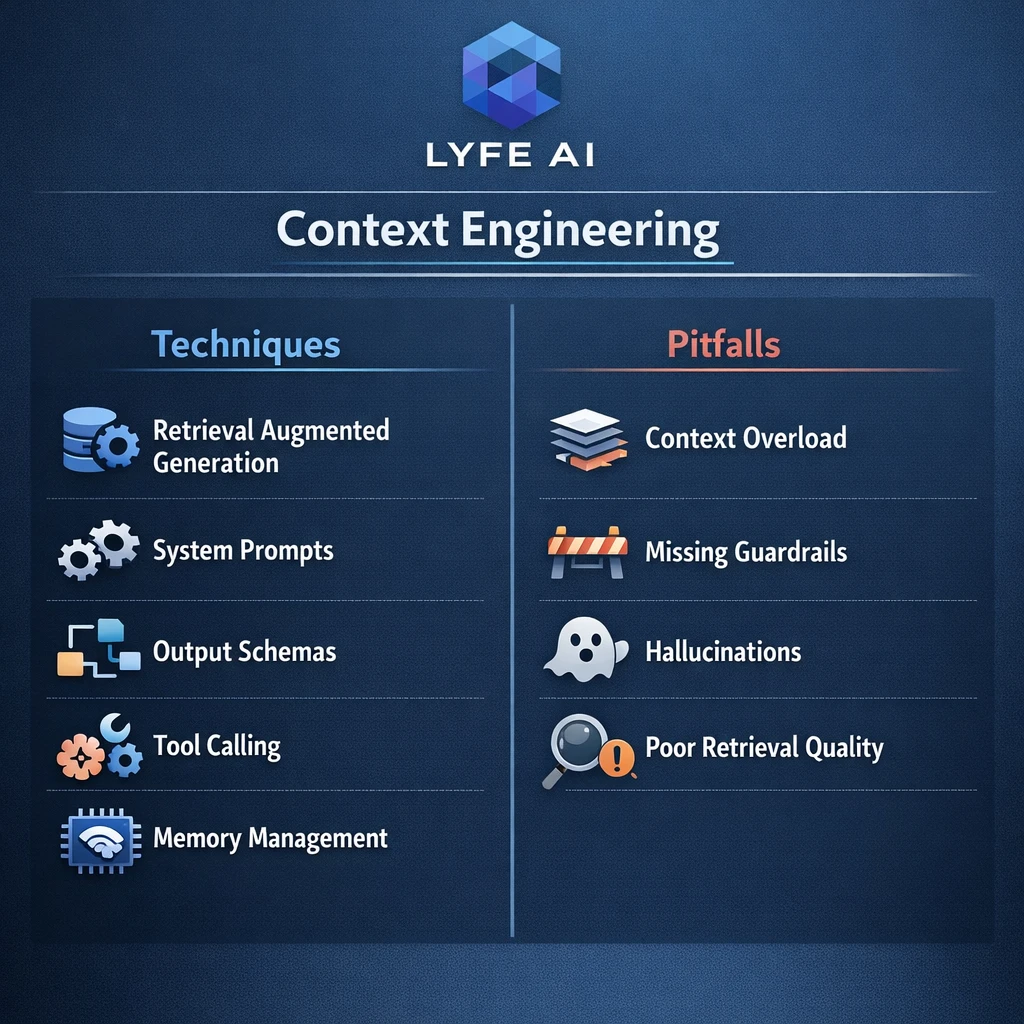
Context engineering sounds grand, but in practice it boils down to a few concrete techniques applied carefully. The first is filtering and ranking. Instead of dumping every related document into context, you run hybrid search (semantic + keyword), rank by relevance, maybe diversity, and keep only the top‑k chunks. This improves the “signal‑to‑noise” ratio the model sees.
Next is compaction and summarisation. Conversation histories and long documents quickly blow out token limits. You summarise older turns, keeping references to promises, constraints, and decisions. You summarise documents into short, structured notes (e.g., bullet lists of key policies), sometimes specialised by intent (“summarise only leave entitlements for AU employees”). Done well, this preserves what matters while cutting cost and confusion.
A more subtle technique is progressive disclosure. Instead of feeding every possible detail into the model, you inject only what’s minimally necessary, then retrieve more if the user asks follow‑up questions. Longterm chat companions and tools like Character‑style systems often do this: they stream in slices of persona and history as needed, rather than splurging everything upfront, a pattern similar to techniques outlined in context‑engineering technique overviews.
On the flip side, there are recurring failure modes:
-
Context bloat – Overloading the window with full documents or entire chat histories, making outputs worse and slower.
-
Over‑compaction – Summaries that strip away critical details (“0.6 FTE” becomes just “part‑time”), causing subtle logic errors.
-
Wrong retrieval granularity – Chunks too small (no context) or too large (lots of irrelevant text).
-
Missing global rules – Safety or compliance prompts that get lost when history is truncated.
-
Leaky memory – Storing personal data without clear retention or access controls, especially sensitive for AU privacy law.
Most teams initially try to fix these by tweaking prompts (“be more accurate”, “don’t hallucinate”), when the real problem is the context pipeline. If you treat prompt changes as band‑aids, issues resurface every time the data, users, or models change—reinforcing why end‑to‑end AI implementation services focus heavily on data handling and retrieval design, not just surface‑level instructions.
5. Scaling From Prompt-Only to Context-Engineered Production Agents
Almost every AI journey follows a similar arc. At first, you hand‑craft a great prompt in the OpenAI UI or your favourite playground. It works surprisingly well. You share it internally, people are impressed, and suddenly everyone wants to use it for more complex workflows. That’s the tipping point.
As the number of scenarios and edge cases grows, prompt engineering alone starts to crumble. Every new product, every new policy update, every AU‑specific exception forces you back into a giant, brittle prompt. Instead of encoding logic and policies in reusable components, engineers end up burning expensive hours (often at $50–200/hr) wrangling and revising prompts and other ad‑hoc text instructions, rather than investing that time into more durable, maintainable systems. It feels cheap up front but becomes very expensive maintenance over time.
Context engineering reverses that pattern. You invest more up front—building retrieval pipelines, memory stores, tool integrations, state management—but your prompts become simpler and more stable. Knowledge lives in docs and databases, not hard‑coded into a 3,000‑token system message. When HR updates a policy, you reindex a document rather than rewrite the assistant’s entire brain, which is exactly how robust stacks for long‑term AI assistant partnerships are designed.
In production, prompt engineering sits inside this larger architecture. You maintain a versioned library of system prompts (per assistant type), each parameterised so your orchestration code can insert jurisdiction tags, brand voice, or escalation rules. The heavy lifting—deciding what data to fetch, how to evaluate retrieval quality, when to escalate to a human—is handled by context pipelines and workflow logic, whether you’re migrating between models using guides like GPT‑5 migration playbooks or standardising assistants across teams.
The payoff is scalability: more use cases, more users, and more complexity without constantly re‑prompting the whole system by hand.
6. Measuring Context Engineering Quality, Reliability, and Hallucinations
You can’t manage what you don’t measure, and context engineering is no exception. There isn’t yet a single “context score” you can track, so you infer quality from downstream performance metrics. The most obvious is task success rate: how often does the assistant meet explicit acceptance criteria on a realistic test set?
Just as important is context failure rate. When something goes wrong, you ask: did the model hallucinate despite having the right information, or did we simply not give it the right information? Many real‑world failures turn out to be the latter—missing docs, irrelevant retrievals, or forgotten constraints—rather than model weakness. In other words, they’re context problems, not capability problems.
Other useful metrics include:
-
Retrieval relevance – Are the top‑k chunks actually on topic?
-
Tool‑call accuracy – Did the model choose the right tool with the right arguments?
-
Token efficiency – Quality or success per token spent.
-
Latency and cost per task – Including retrieval, summarisation, and tool execution.
-
User satisfaction – Especially trust, perceived memory, and willingness to rely on the assistant.
In regulated spaces—finance, healthcare, government—qualitative trust matters as much as raw accuracy. AU organisations, in particular, are sensitive to privacy and compliance. If staff see the assistant mis‑remembering conditions or mixing US and AU legal frames, trust evaporates. That’s why strong context engineering, with clear jurisdiction tagging and careful memory design, is such a competitive advantage, especially for workflows like AI transcription supporting clinician‑patient interactions where errors directly impact care.
You can iterate via A/B tests: compare different retrieval strategies, different summary lengths, or different ordering of context, and see which combination gives the best outcomes on your core metrics.
7. Context Engineering in Everyday Knowledge Work and Chatbots
Context engineering is not just for hardcore agent frameworks. Individual knowledge workers already do a lightweight version of it every day—often without naming it. Any time you paste a doc into ChatGPT, mention “use the email thread below”, or say “here’s our AU policy, answer based only on this”, you’re hand‑crafting context selection.
The difference, in a more mature setup, is that retrieval happens for you. Instead of digging through Google Drive or SharePoint, your assistant can automatically pull the most relevant files from your workspace, using your permissions as a natural context boundary. You ask, “Summarise the last three board reports and highlight AU‑specific risks,” and it knows which docs to open and what “AU‑specific” implies. This is the kind of experience that modern secure Australian AI assistants aim to deliver out‑of‑the‑box.
For AI companions and chatbots, context engineering looks like:
-
Managing dialogue history so the bot remembers key facts but doesn’t bloat the context window.
-
Maintaining a stable persona and tone over weeks or months.
-
Applying privacy filters to avoid resurfacing sensitive details in the wrong setting.
Many consumer‑style chat systems quietly use progressive disclosure—feeding in only slices of your profile and chat history as needed. Simpler bots might only track a few fields of state (name, role, region) but that is still rudimentary context engineering. For Australian teams, even these small steps—like tagging users by state for workplace laws—can dramatically reduce wrong or generic answers, especially when combined with secure AI transcription and data‑handling practices.
As you scale up, the same ideas just become more formal: long‑term memory stores, RAG pipelines, and richer tool integrations, which also underpin AI‑powered education and training experiences for Australian teachers.
Practical Playbook: How to Start Context Engineering in Your Organisation
Bringing this all together, how do you actually start context engineering without disappearing into a months‑long platform project? A pragmatic path looks like this:
-
Lock in a solid base prompt. Spend a few days manually tuning a clear, concise system prompt: role, tone, safety rules, jurisdiction (e.g., “assume AU law”), escalation behaviour. Keep it under tight version control.
-
Identify your core knowledge sources. For example: HR policies, product docs, AU‑specific compliance guidelines, CRM records. Decide which ones are in‑scope for your first assistant and how often they change.
-
Implement simple retrieval first. Even a basic vector search over PDFs and Notion pages is a huge upgrade from hard‑coding knowledge into prompts. Start with conservative top‑k values (3–5), then tune.
-
Add memory in narrow slices. Store only what you actually need between sessions: user preferences, previous decisions, key ticket outcomes. Tag everything carefully (user ID, jurisdiction, sensitivity).
-
Design your ordering and compression strategy. System prompt first, then high‑level policies, then recent dialog, then retrieved docs. Summarise history aggressively once it exceeds a few turns.
-
Integrate tools last, not first. Many teams rush to tools. Instead, once retrieval and memory are working, add a small set of clearly described tools (e.g., “get_user_subscription”, “fetch_latest_policy”) with strict argument schemas.
-
Measure, then iterate. Define a small test suite of realistic tasks. Track success rate, context failures, token usage, and user feedback. Adjust retrieval, summarisation, and ordering based on evidence—not vibe.
Throughout this process, keep prompt engineering in its proper place: as the layer that sets behaviour and formatting, not the layer that smuggles in all your domain knowledge. The goal is to gradually shift from hand‑built, prompt‑centric hacks to a robust, context‑centric system that can flex as your Australian business, data, and regulations evolve, whether you’re building assistants, transcription tools, or secure data‑sensitive workflows.

Conclusion & Next Steps with LYFE AI
The centre of gravity in AI has moved. We’re no longer in an era where the biggest wins come from a clever one‑page prompt. Today, the real leverage is in context engineering—the discipline of deciding what your model sees, from where, in what order, and with which guardrails, every single time it’s called. Prompt engineering still matters, but as one powerful tool inside a much larger system.
If you’re building AI assistants, agents, or copilots for an Australian audience, this shift is your opportunity. By treating context as a product feature—measured, tuned, and iterated—you can ship systems that are more accurate, more compliant, and far more trustworthy than prompt‑only competitors, especially when paired with production‑ready foundations like AI‑augmented IT support and personal assistants.
If you’d like help designing or scaling that kind of context‑engineered stack, LYFE AI (Based out of Newcastle NSW) can partner with your team—from early prototypes through to production‑grade agents with retrieval, memory, and tools. Take the next step: document your first context pipeline on paper, pick one high‑value workflow, and start building with intent. The prompts will follow, and resources like the complete GPT‑5 guide can support your model choices along the way.
© 2026 LYFE AI. All rights reserved.
Frequently Asked Questions
What is context engineering in AI and how is it different from prompt engineering?
Context engineering is the practice of designing everything the AI model “sees” before it responds: system prompts, user history, retrieved documents, tools, and output schemas. Prompt engineering focuses mainly on crafting the text instruction you type into the model. For simple, one‑off tasks, prompt engineering can be enough, but for production AI assistants and agents you need context engineering to coordinate data, rules, and tools reliably at system level.
When should I use prompt engineering only, and when do I need context engineering?
Prompt engineering alone is usually fine for demos, personal productivity, and simple workflows like drafting emails or brainstorming. You need context engineering when your AI has to use your own data, handle many users, call tools or APIs, or run inside a business process where reliability and auditability matter. As soon as you’re building an AI assistant, agent, or IT support bot for real customers, you should treat context design as a core part of the architecture.
What is temperature in AI and how does it affect model outputs?
Temperature in AI is a setting that controls how random or deterministic the model’s responses are. A low temperature (close to 0) makes the model more focused and predictable, while a higher temperature makes it more creative and varied. In production AI systems, temperature is one part of context engineering because it changes how the model uses the context you feed it.
How do AI temperature settings work in tools like ChatGPT?
AI temperature settings work by adjusting the probability distribution over the model’s next possible tokens (words or pieces of words). At low temperatures, the model strongly prefers the most likely next tokens, leading to consistent but sometimes repetitive answers. At higher temperatures, it samples from a wider range of tokens, which can produce more novel or unexpected responses but also more risk of drift or hallucinations.
What does temperature mean in ChatGPT compared to other context settings?
In ChatGPT, temperature specifically controls randomness in how the model chooses words, while other context settings control *what* information the model sees and *how* it should behave. Things like system prompts, retrieved documents, tool definitions, and output schemas are all context engineering levers. Temperature is a complementary dial you use alongside those levers to balance creativity vs reliability.
How to choose the right AI temperature for a production assistant or agent?
Start with a low temperature (around 0–0.3) for tasks that require accuracy, compliance, or consistent formatting, such as IT support, policy answers, or reporting. Use moderate temperatures (0.4–0.7) for tasks that benefit from some creativity but still need to stay grounded in your context, like marketing copy or internal knowledge summaries. Always test temperature choices with real examples and measure error rates and user satisfaction before rolling them out widely.
Why does AI temperature affect randomness and hallucinations?
Temperature affects the randomness because it changes how sharply the model prefers high‑probability tokens over lower‑probability ones. At higher temperatures, the model is more willing to pick less likely words, which can increase creativity but also the chance of responses that stray from your documents or policies. In a context‑engineered system, you typically combine lower temperature with better retrieval, tool use, and validation to keep hallucinations down.
What is a good temperature setting for AI writing in a business context?
For business writing that must be accurate and on‑brand—like client emails, proposals, and IT support replies—a temperature between 0.2 and 0.5 is often a good starting point. Use the lower end for factual, policy‑driven content and the higher end for creative marketing or brainstorming. You can also run A/B tests on different temperatures within your context‑engineering pipeline to see which setting yields better quality for your team.
Can I change the temperature of my AI assistant once it’s in production?
Yes, in most modern AI platforms you can change the temperature for each model call, and many teams expose it as a configuration per use case. In production, it’s best to treat temperature as a controlled parameter, adjust it in small increments, and monitor effects on accuracy, user satisfaction, and escalation rates. LYFE AI can help design assistants where temperature and other context settings are tuned and versioned like any other piece of infrastructure.
How to set temperature for AI content generation as part of context engineering?
Define the content type and risk tolerance first—support answers, knowledge summaries, or marketing copy all justify different temperatures. Then set an initial temperature range per use case (for example, 0.1–0.3 for support, 0.3–0.6 for content) and test against real prompts and documents. In a full context‑engineering workflow, you pair this with retrieval settings, guardrails, and validation checks so the model stays grounded even when you allow more variability.
How does LYFE AI help Australian teams with context engineering for production AI?
LYFE AI works with Australian organisations to design the full context stack around models: system prompts, retrieval pipelines, tool integrations, and parameters like temperature and max tokens. They focus on turning one‑off prompt experiments into stable assistants and agents that respect your data, policies, and IT environment. This includes use cases like AI IT support for Australian SMBs, internal knowledge assistants, and workflow‑integrated agents.
How do I start context engineering in my organisation without a big AI team?
Begin by picking one or two high‑value workflows, such as internal IT questions or policy FAQs, and mapping the sources of truth the AI should depend on. Then design a simple context pipeline: a clear system prompt, a retrieval step from your documents, conservative temperature settings, and basic success metrics like accuracy and deflection rate. Partners like LYFE AI can help you formalise this into a repeatable playbook as you add more assistants and use cases.