
Introduction: Why Multimodal Models Assistants Matter Now

Multimodal models assistants are fast becoming the new normal for AI in business. Instead of only reading and writing text, these assistants can look at an image, listen to audio, read a PDF, and respond in natural language – all in one flow. However, some experts argue that calling multimodal assistants “the new normal” overstates where most businesses actually are today. Outside of digital-native and AI-forward teams, many organizations are still in early pilots, limited to text-only chatbots, or blocked by regulatory, security, or data-quality constraints. In heavily regulated sectors, or in companies without strong ML infrastructure, multimodal isn’t yet a default—it’s an aspiration. So while the direction of travel is clear and the momentum is real, it’s more accurate to say multimodal assistants are rapidly *emerging* as the new normal, rather than already being universally embedded across every industry and region. For Australian organisations trying to tame messy, real‑world data, that’s a game‑changer.
At LYFE AI, we see a simple pattern: teams don’t have a “text‑only” world. They have screenshots, recordings, contracts, photos from site visits, spreadsheets, even sensor traces. A multimodal models assistant can connect all of that, make sense of it, and then act – from answering complex questions to triggering workflows.
In this guide, we’ll unpack what “multimodal” really means in plain language, walk through the core architecture, and explain how modern transformers and attention hold everything together. We’ll also explore how a multimodal AI assistant differs from a raw model, how it stacks up against text‑only GPT‑style systems, and, most importantly, how Australian businesses can start applying it today.
By the end, you’ll know enough to have a serious, practical conversation about where a multimodal models assistant fits into your roadmap – and what to look for when you build or buy one.
According to industry research on multimodal AI, these assistants are becoming foundational across sectors.
Multimodal AI in Plain Language (vs Traditional AI)
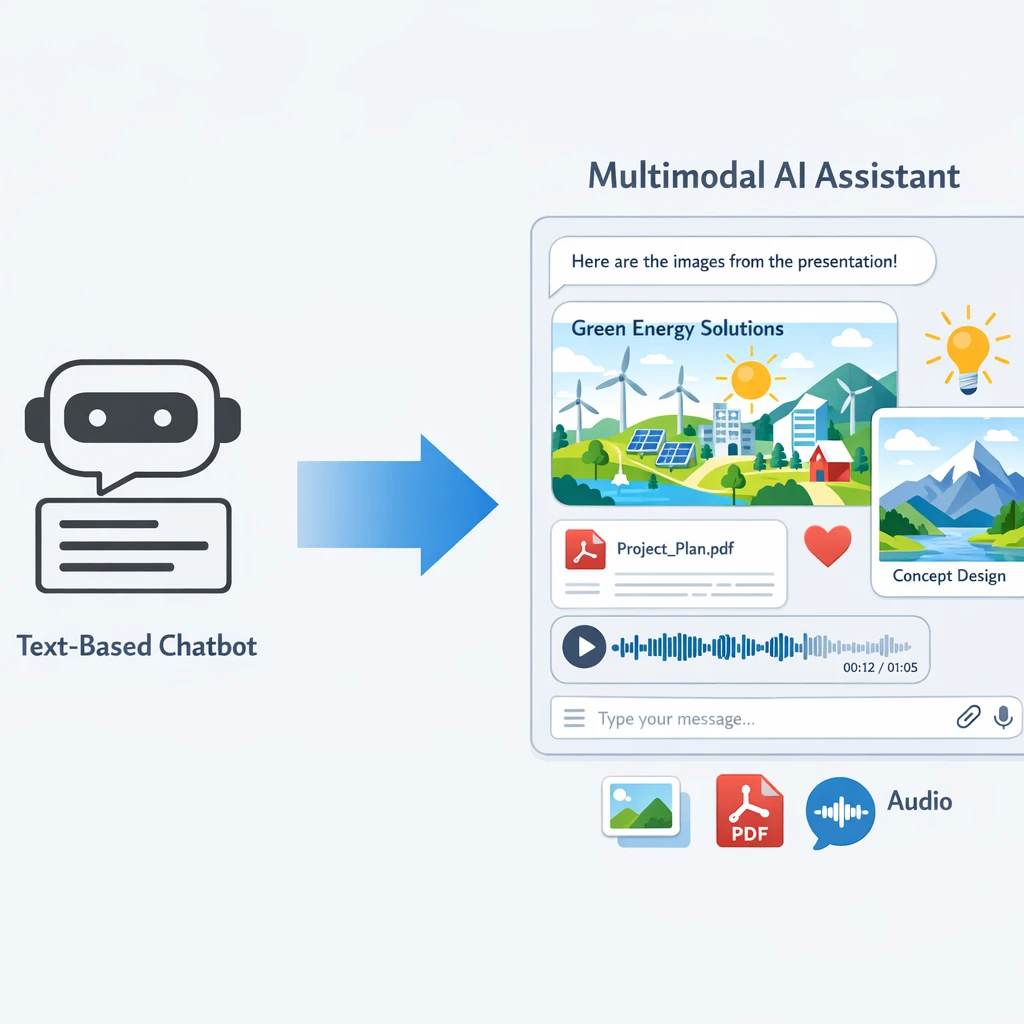
Let’s strip away the jargon. A modality is just a type of data. Text is one modality. Images are another. Audio, video, sensor readings, tables – each is a different way the world shows up in data form.
A multimodal AI model is a model that can work across several of these types at once. It can understand and often generate text, analyse images, listen to audio, and combine them to produce a single, coherent response. Under the hood, it learns a shared way of thinking about concepts across formats. For example, the text phrase “red apple” and a photo of a red apple end up close together in the model’s internal “idea space”. That shared space is what allows cross‑modal reasoning and generation.
Traditional or unimodal AI systems are built to focus on a single type of input. A classic GPT‑style language model, for instance, is designed around text: it processes text prompts and generates text responses. A computer vision model, on the other hand, is built to interpret images and video, working directly with pixels rather than language. If you want to combine these capabilities—say, to understand an image and then reason about it in natural language—you typically have to stitch together separate models and infrastructure, and then hope they play nicely as a single system.
With a multimodal models assistant, you don’t need that patchwork. You can upload a product photo, paste an error log, and ask in plain English: “Why is this unit failing and how do we fix it before it hits the customer?” The assistant fuses all the signals and returns one answer. In practice, this also helps reduce hallucinations, because the AI has more context to cross‑check itself instead of guessing from thin air.
For Australian teams working across field operations, customer support, or healthcare, that mix of modalities is just daily life. However, some experts argue that simply throwing more context at the problem doesn’t magically eliminate hallucinations. Larger context windows hit diminishing returns and can drive up cost and latency, especially when a lot of that extra data is only loosely related to the question. Even when the right information is present, models can still misprioritize what they “pay attention” to and lean on internal guesses anyway. And if the inputs themselves are noisy—wrong part numbers, messy logs, or a bad retrieval step in a RAG pipeline—the model can end up confidently grounded in the wrong thing. In other words, richer multimodal context is a powerful tool, but it has to be high‑quality, well‑scoped, and carefully routed, or you risk just shifting how hallucinations show up instead of solving them outright. Which is exactly why multimodal AI is moving from a “nice to have” experiment to a practical, front‑line assistant, especially when paired with a secure AI transcription strategy and robust AI implementation services.
As outlined in a complete overview of multimodal AI, combining modalities also tends to improve robustness and downstream task performance.
Technical Architecture: How a Multimodal Models Assistant Works
Under the smooth chat interface, a multimodal models assistant is built from three main building blocks: input modules, a fusion module, and output modules. The idea is simple even if the maths isn’t.
First, the input modules. Each modality has its own specialist neural network – often called an encoder. A text encoder (usually a transformer‑based large language model) turns words into vectors. A vision encoder such as a CNN or Vision Transformer turns image patches into embeddings. An audio encoder converts sound into spectrograms and then into tokens. Each encoder creates a compact, numerical representation in its own space.
Next comes the **fusion module**, the true “multimodal” heart. Its job is to bring all those different embeddings into a shared latent space and let them talk to each other. There are multiple fusion strategies – early, mid, and late fusion – but modern systems typically use transformer layers to align tokens from different modalities. Attention mechanisms help the model decide which parts of which input matter for the current task, especially when data is noisy or conflicting.
Finally, you have the output module. Often this is again a language model head that turns the fused representation back into text, such as a natural‑language explanation or an action plan. In other cases, the output might be another image, a structured JSON object, or even a sequence of tools to call (for example, “send this as an email and log the summary in the CRM”).
A multimodal models assistant wraps this stack in a conversational shell: session memory, user profiles, permissions, logging, and integrations with your existing systems. That’s the layer where LYFE AI focuses on turning core models into something that actually fits into your workflows, including AI‑powered IT support for Australian SMBs and AI personal assistant deployments.
Vendors typically orchestrate this around frontier models such as those profiled in surveys of top multimodal architectures, which highlight how text, image, and audio branches are fused.
Transformers, Tokens and Attention in Multimodal Models
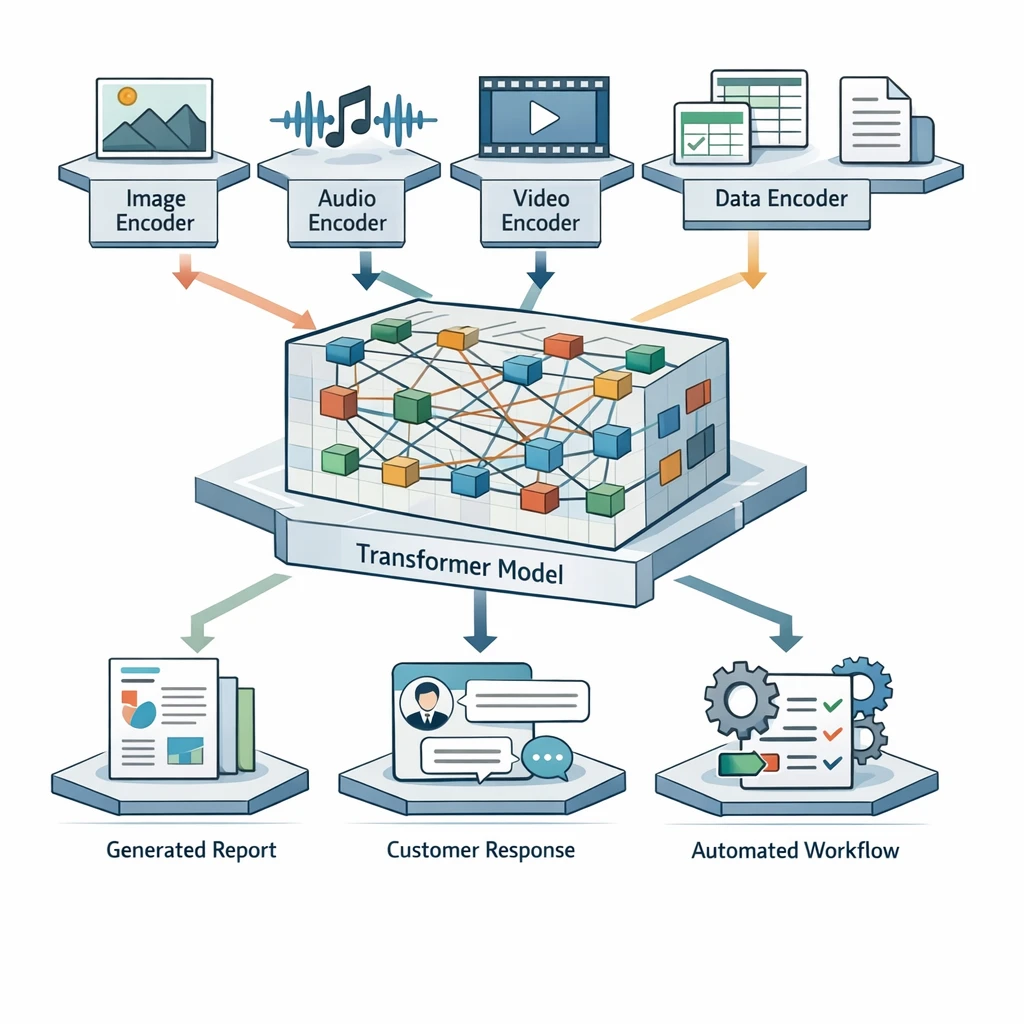
Most frontier multimodal systems today are built on transformer-based architectures. The key trick is to treat everything – text, images, even audio – as sequences of tokens that a (usually) shared transformer stack can reason over, often with modality-specific encoders or adapters on the front. In practice, that means transformers (and close variants with self- and cross-attention, sometimes mixed with MoE layers) form the core of models like Gemini, NVLM, and many state-of-the-art vision-language systems, even when they plug into non-transformer backbones for things like image feature extraction..
Text is broken into small units like words or sub‑words using techniques such as Byte Pair Encoding. Images are split into patches (often 16×16 pixels), and each patch is run through a vision encoder to produce a “visual token”. Audio is converted to a spectrogram, then discretised into tokens or patches as well. The model then receives one long sequence like:
[<img_token_1> ... <img_token_n> <sep> <text_token_1> ... <text_token_m>]
With positional encodings and special modality tags, the transformer knows which token came from where and in what order. From there, self‑attention and cross‑attention do the heavy lifting. Every token can “look at” every other token and decide how much to care about it when building its own representation.
This is incredibly powerful for tasks like:
- Reading a scanned invoice and matching line items to a purchase order.
- Looking at a medical image while considering a doctor’s written notes.
- Listening to a customer’s tone while reading their support ticket history.
Because many modalities share the same transformer layers, some patterns and skills can transfer across them. Shared representations make it easier for the model to align concepts between, say, text and images. That means skills learned in language (like following instructions or reasoning about abstract concepts) can help the model make better sense of what’s in an image, and vice versa. At the same time, not everything transfers equally well—low-level, modality-specific details (like raw pixels or audio waveforms) often still need specialized components—so modern architectures usually balance shared layers with modality-specific ones. Even so, this shared core is a big reason why visual grounding can help the model avoid making up facts that contradict what it sees.
Of course, this comes with a cost: more tokens mean more compute and higher latency. That’s why a production‑grade multimodal models assistant has to be smart about token budgets, compression, and routing – for instance, only sending full‑resolution images when they’re actually needed for the task at hand, or using well‑designed AI prompts to minimise unnecessary context.
Analyses from enterprise AI experts emphasise that this token‑centric approach is now the dominant paradigm for large multimodal models.
Multimodal AI Assistant vs Raw Multimodal Model
It’s important to separate the idea of a multimodal model from a multimodal AI assistant. They’re related, but not the same thing.
A raw model is like an engine on a test bench. You feed it text, images, or audio; it predicts the next tokens; and that’s it. It doesn’t remember your organisation. It doesn’t know your tools. It can’t take actions by itself beyond returning output.
A multimodal AI assistant is that engine placed into a fully built car. Around the core model, you have:
- Conversation and memory – keeping chat history, user context, and long‑term preferences.
- Tool use and API calls – the ability to trigger external systems (CRMs, ticketing, email, data warehouses).
- Security and governance – authentication, permissions, audit trails, data residency (key for Australian compliance).
- Multi‑output channels – responding with text, speech, summaries, image edits, or even code.
For example, GPT‑4o is a multimodal model exposed through ChatGPT, which acts as a multimodal assistant: it can see screenshots, listen to your voice, and then speak back or generate text. DALL‑E, on the other hand, is more of a single‑purpose model focused only on images.
In business settings, the assistant layer is where most of the value is realised. It’s where you decide, “When a user uploads a photo of damage from a regional warehouse, cross‑reference it with our asset database, suggest a repair plan, and log a job in our system.” Without that orchestration layer, you just have impressive but isolated demos.
So when you evaluate solutions, ask not only “What model does it use?” but also “How complete is the assistant layer, and how easily can it plug into our real processes?” Platforms like LYFE AI’s secure Australian AI assistant are designed to provide this glue between models and day‑to‑day operations.
Industry explainers such as Salesforce’s guide to multimodal AI reinforce that the surrounding assistant layer is where business value is captured.
Multimodal Models Assistant vs Text‑Only GPT‑Style Models
Text‑only GPT‑style models are still extremely useful. They’re fast, relatively cheap, and superb at pure language tasks like drafting, editing, or coding. But they’re limited to that single stream of information: text in, text out.
A multimodal models assistant, by contrast, can:
- Accept text, images, audio, and video in one prompt.
- Perform cross‑modal reasoning, like checking if a written report matches the attached photo.
- Reduce hallucinations by grounding answers in visual or audio evidence.
- Stay useful even when one modality is noisy or missing, by leaning on others.
Imagine a support scenario. With a text‑only system, your customer must carefully describe what they see on‑screen: “The button in the top‑right is greyed out, and the label says…”. With a multimodal assistant, they just upload a screenshot or share their screen. The assistant can visually inspect the UI, read the text, and respond much more directly.
The trade‑offs are real, though. Multimodal systems usually require more compute per query and can be slower. For tasks that are 100% text – for example, refactoring code, generating documentation, or summarising chat logs – a well‑tuned text‑only model might still outperform a multimodal model on cost‑performance.
The sweet spot is often a hybrid approach: route pure language tasks to leaner text‑only models and send mixed‑media tasks to the multimodal assistant. A smart orchestration layer can make this routing invisible to end users while keeping your costs in check, especially when planning migrations to next‑generation systems covered in guides to GPT‑5 and future models.
Analysts at McKinsey note that organisations often gain the most by combining specialised text models with richer multimodal systems.
Practical Applications and Tips for Australian Businesses
So how can an Australian organisation actually use a multimodal models assistant in practice? Let’s ground this in concrete, everyday scenarios rather than sci‑fi.
In field services and utilities, technicians already take photos and videos on‑site. A multimodal assistant can:
- Analyse a photo of equipment, identify the model, and pull up the relevant maintenance steps.
- Transcribe and summarise a voice note from the technician into a structured job report.
- Flag safety issues based on what it sees – missing PPE, damaged fixtures, obvious leaks.
In healthcare, where privacy and accuracy are critical, multimodal assistants can help clinicians by reading a radiology report, looking at an image (under strict controls), and drafting a patient‑friendly explanation in plain English. The clinician stays in the loop but saves time on repetitive documentation, especially when supported by clinical AI transcription that enhances clinician‑patient interactions.
In customer experience, call centres across Australia are already recording calls and logging chats. A multimodal assistant can listen to call audio, note sentiment shifts, match what was said against the on‑screen journey, and propose the best next step or an upsell offer – all while generating compliance‑ready summaries.
A few practical tips when getting started:
- Start with a narrow, high‑value workflow. Pick one use case – e.g., invoice processing with scanned PDFs and emails – and prove value there.
- Audit your data modalities. List what you actually have: images, recordings, PDFs, logs. This shapes which capabilities you prioritise.
- Think about humans in the loop. For higher‑risk outcomes, design review steps where staff can approve or correct the assistant.
- Plan for governance early. Decide where data is stored, who can see what, and how prompts and outputs are logged.
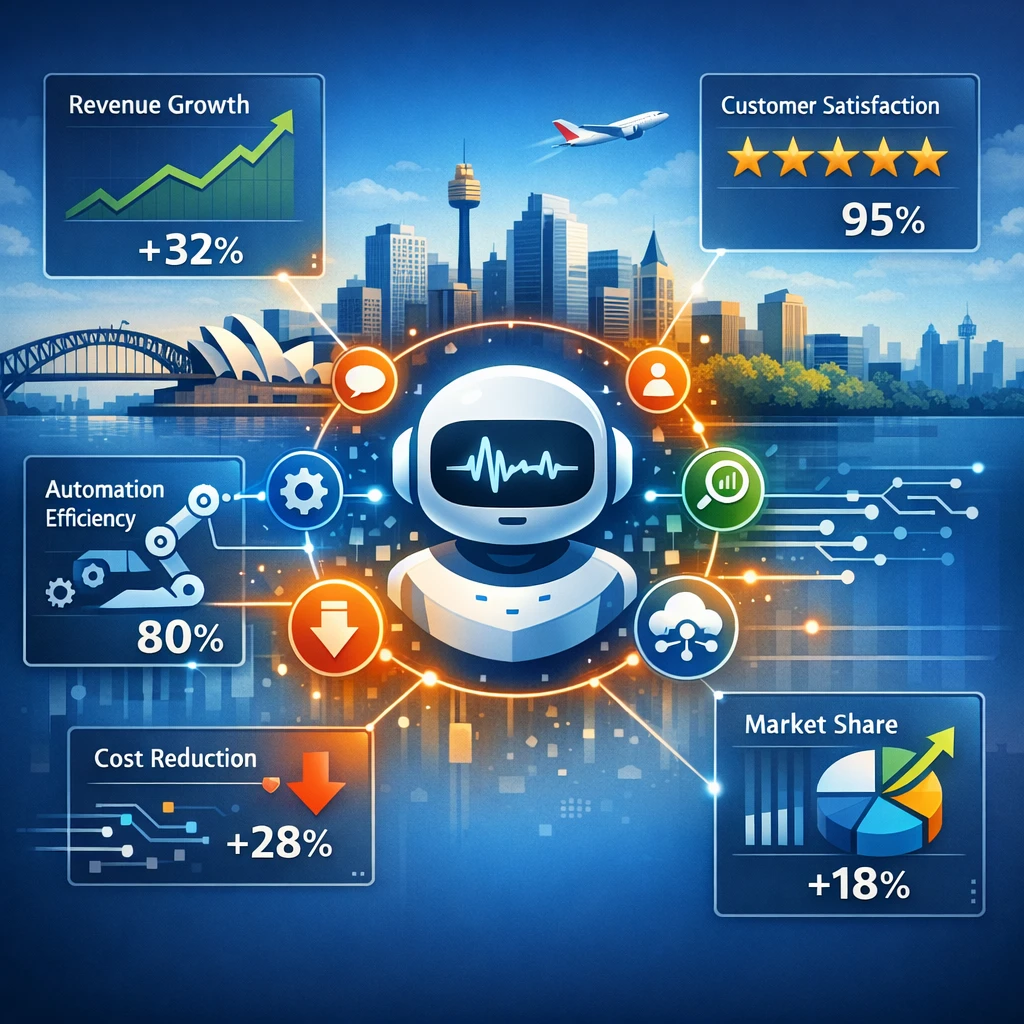
Multimodal models assistants are not magic wands, but they are very pragmatic tools when grounded in real workflows and clear success metrics – like reduced handling time, fewer manual data entry errors, or higher customer satisfaction scores. Many organisations pair them with dedicated AI implementation partners who understand both the technology and local regulatory context.
Case studies in Google Cloud’s multimodal AI use cases show similar patterns of value in customer support, document processing, and field operations.
Conclusion & Next Steps
Multimodal models assistants mark a clear shift in how we work with AI. Instead of bending our processes to fit a text box, we can finally bring AI into the messy, multi‑format reality of business – screenshots, recordings, PDFs, and all.
By understanding the basics – modalities, encoders, fusion, transformers, and the assistant layer on top – you’re far better equipped to cut through the hype and spot where multimodal AI genuinely fits your organisation. Use multimodal models assistants where multiple data types collide, where hallucinations are costly, and where humans are burning time stitching information together manually.
The next step is simple: map one concrete workflow where multimodal context would clearly help, then pilot an assistant around that. Measure the impact, iterate, and expand from there. Multimodal AI doesn’t have to be a moon‑shot project; it can be a series of focused wins.
If you’d like to explore how to apply a multimodal models assistant to your own environment – from field ops to customer support – bring your use case ideas and start designing a small, high‑leverage experiment, or explore how to become an AI educator inside your organisation to upskill your teams on these tools.
For many teams, deploying a multimodal AI personal assistant alongside core business workflows is an accessible first step that builds confidence and internal capability.
Frequently Asked Questions
What are multimodal AI models?
Multimodal AI models are systems that can understand and generate more than one type of data, such as text, images, audio, video, and documents. Instead of only reading and writing text, they can, for example, read a PDF, interpret a screenshot, listen to a call recording, and then respond in natural language in a single workflow.
How do multimodal models work in a business assistant like LYFE AI?
Multimodal models in LYFE AI take different inputs—like emails, PDFs, images from site visits, support call recordings, and spreadsheets—and convert them into a common internal representation (tokens) that the model can reason over. The assistant then uses transformers and attention mechanisms to find patterns across all those inputs, generate a relevant response, and optionally trigger connected workflows such as CRM updates, ticket routing, or report creation.
What is temperature in AI?
Temperature in AI is a setting that controls how random or deterministic the model’s responses are. A low temperature makes the model stick closely to the most likely answer, while a higher temperature lets it explore more diverse and creative possibilities.
What does temperature mean in ChatGPT or LYFE AI’s assistant?
In ChatGPT or LYFE AI’s multimodal assistant, temperature is a number (usually between 0 and 1 or up to 2) that tells the model how “bold” it should be when choosing the next word or token. Lower temperatures (e.g. 0.1–0.3) produce focused, repeatable answers, while higher temperatures (e.g. 0.7–1.0) produce more varied, exploratory output—useful for brainstorming or creative content.
How do AI temperature settings work under the hood?
When the model predicts the next token, it calculates probabilities for many options; temperature mathematically scales these probabilities before sampling. Lower temperature sharpens the distribution so the model almost always picks the top options, while higher temperature flattens it, giving less likely tokens a better chance and increasing randomness.
Why does AI temperature affect randomness in the answers?
Temperature changes how strongly the model prefers its top-ranked choices over less likely ones. As you raise the temperature, it becomes more willing to pick lower-probability tokens, which makes outputs feel more surprising, creative, and sometimes less consistent; lowering temperature does the opposite, making answers more stable and predictable.
How to choose the right AI temperature for my business use case?
Use low temperatures (around 0.0–0.3) for tasks that require accuracy, compliance, and repeatability, such as policy summaries, customer support responses, and internal reporting. Use moderate to higher temperatures (0.5–0.9) for ideation, marketing copy, UX wording options, or when you want varied options to choose from, and adjust based on how consistent vs creative you need the output to be.
What is a good temperature setting for AI writing in a business context?
For professional business writing like emails, proposals, and knowledge-base articles, many teams find a temperature around 0.3–0.6 works well—balanced between clarity and creativity. LYFE AI can help you set different defaults per workflow, such as lower temperature for policy-sensitive content and slightly higher for campaign or blog copy.
Can I change the temperature of my AI assistant in LYFE AI?
Yes. In most LYFE AI deployments, temperature and related generation settings can be configured per use case, such as a workflow for support tickets vs one for marketing content. LYFE AI’s team can also lock or narrow the temperature range for regulated or high‑risk processes to keep outputs controlled and compliant.
How to set temperature for AI content generation inside LYFE AI?
You typically set temperature at the workflow or template level, choosing different values for tasks like summarisation, reply drafting, or content creation. LYFE AI’s implementation team usually starts with recommended defaults for your industry, then refines them based on user feedback, quality reviews, and A/B testing of different output styles.
What’s the difference between a multimodal AI assistant and a raw model like GPT?
A raw model like GPT is the core engine that processes tokens but doesn’t handle your business logic, integrations, or governance on its own. LYFE AI wraps multimodal models in an assistant layer that adds secure data connections, role-based access, workflow automation, prompt design, logging, and guardrails so it can operate as a reliable co‑pilot within your organisation.
How do multimodal models compare to text-only GPT-style models for Australian businesses?
Text-only models are strong for pure language tasks, but they can’t directly understand screenshots, field photos, PDFs with diagrams, or audio recordings, which are common in real Australian operations. Multimodal models let LYFE AI read and cross‑reference all these formats in one flow—for example, checking a contract PDF, a site photo, and a maintenance log together—leading to better automation and richer insights.
What are practical use cases for LYFE AI’s multimodal models assistant in Australian organisations?
Common use cases include analysing support tickets plus call recordings, reading and summarising contracts or compliance PDFs, understanding photos from site inspections, and generating reports from mixed text and spreadsheet data. Australian teams also use LYFE AI to triage complex customer queries, automate document-heavy workflows, and surface insights from previously hard-to-use unstructured data.
How does LYFE AI handle security and regulation when using multimodal models?
LYFE AI is typically deployed with enterprise controls like role-based access, data residency options, encryption in transit and at rest, and detailed audit logging. For regulated Australian sectors, it can be configured to restrict which documents and media types are processed, apply additional redaction or masking, and route high‑risk tasks for human review before actions are taken.